Ticket Deflection: What It Really Measures - and Where It Stops Working
In this article
Key Takeaways:
- Ticket deflection measures whether a human agent was involved in a request and says nothing about whether the customer’s problem was solved.
- Refunds and cancellations require completed actions in connected systems to be resolved, placing them beyond the reach of answer-only deflection.
- The accuracy of your AI agent depends entirely on the quality of your documentation, as outdated policies and conflicting articles produce wrong answers.
- Tracking deflection rate, resolution rate, and re-contact rate side by side reveals the full picture that any single metric leaves incomplete.
- Refunds and billing changes can be automated safely once the charge is verified and all actions are logged.
Ticket deflection is the easiest metric for a customer support team to improve and the hardest to trust. When a customer closes the chat, the dashboard logs a win, but nobody knows whether the problem was solved or the customer simply gave up.
According to Gartner's 2024 survey, only 14% of issues are fully resolved in self-service. Add the customers who come back later through another channel, and the rate you report can sit well above the customer experience they actually get.
This guide explains what ticket deflection measures, how to calculate it properly, which benchmarks are worth quoting, and when ticket deflection initiatives stop working.
What Is Ticket Deflection? The One-Sentence Version
It is the share of customer questions resolved without a human agent opening a ticket, through self-service channels such as a help center, an in-product hint, or an AI agent. That is the basic and most precise ticket deflection meaning. The customer gets immediate access to the right answer, faster than a human support agent can send one, so the support queue stays shorter. Support ticket deflection is a sound idea. The trouble starts when the metric is treated as proof that customers received the needed help.
The Line Between a Deflected Ticket and an Abandoned One
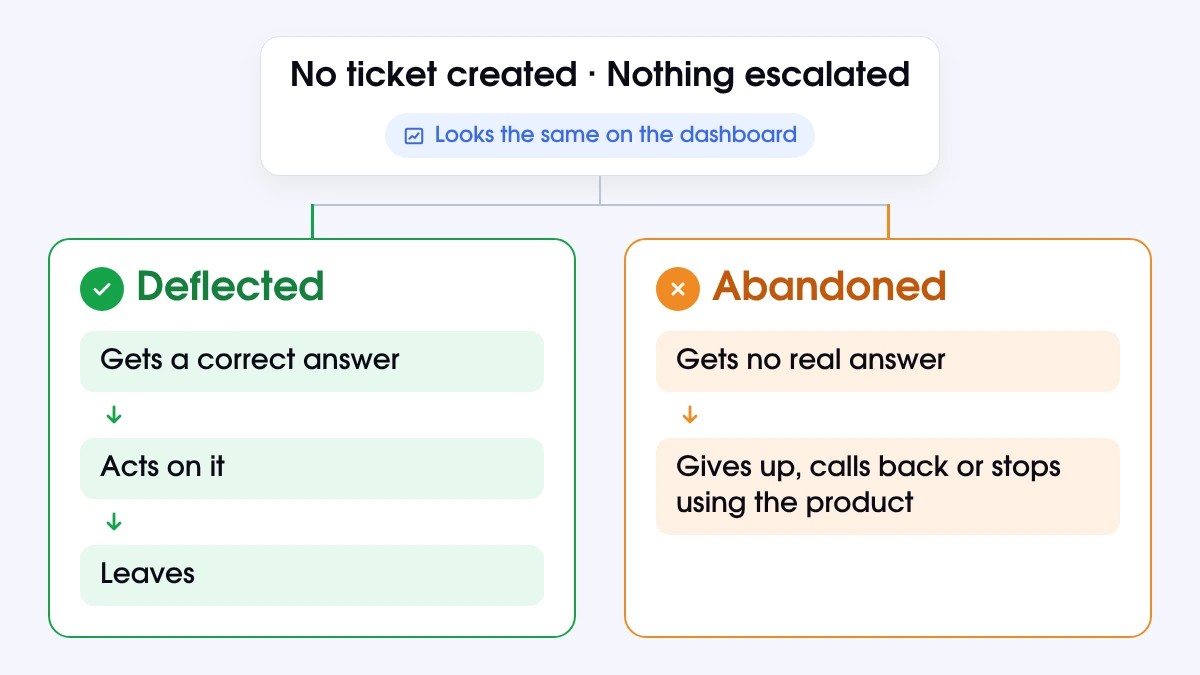
On a dashboard, a deflected ticket and an abandoned one look the same. There is no ticket creation, and nothing is escalated. The difference boils down to what happens after a customer interacts with the bot. A deflected customer gets a correct answer, acts on it, and leaves. An abandoned customer is left without any response, then gives up, calls back, or stops using the product.

In another Gartner survey of 6,138 customers, 38% of Gen Z and millennial customers said they were likely to give up on an issue they could not resolve in self-service. In the same study, 55% said they would use the product less and 52% said they would not buy from the company again. None of it touches the deflection rate, so the number looks healthy while customers leave.
Three Numbers Teams Use Interchangeably, and Shouldn’t
Three terms often get swapped in vendor decks, though they measure different things.
|
Metric |
Definition |
Formula |
What it hides |
|
Deflection |
A contact that never became a ticket |
Contacts without a ticket ÷ total contacts |
Customers who gave up |
|
Containment |
A conversation that stayed in the automated channel |
Conversations not escalated ÷ conversations started |
Wrong answers nobody challenged |
|
Resolution |
A problem that was solved and stayed solved |
(Resolved − reopened or re-contacted) ÷ eligible contacts |
Whatever the denominator excludes |
Resolution is the strictest of the 3 because it checks the outcome. A resolution counts only when the issue was solved and stayed solved, measured against every eligible contact within total support interactions. The difference between deflection and resolution rates shows roughly how many customers left without real help.
Calculating Your Ticket Deflection Rate Without Flattering It
Calculating ticket deflection takes one division. Calculating it accurately takes two more decisions:
- what counts as a contact
- who comes back
The Formula Everyone Quotes
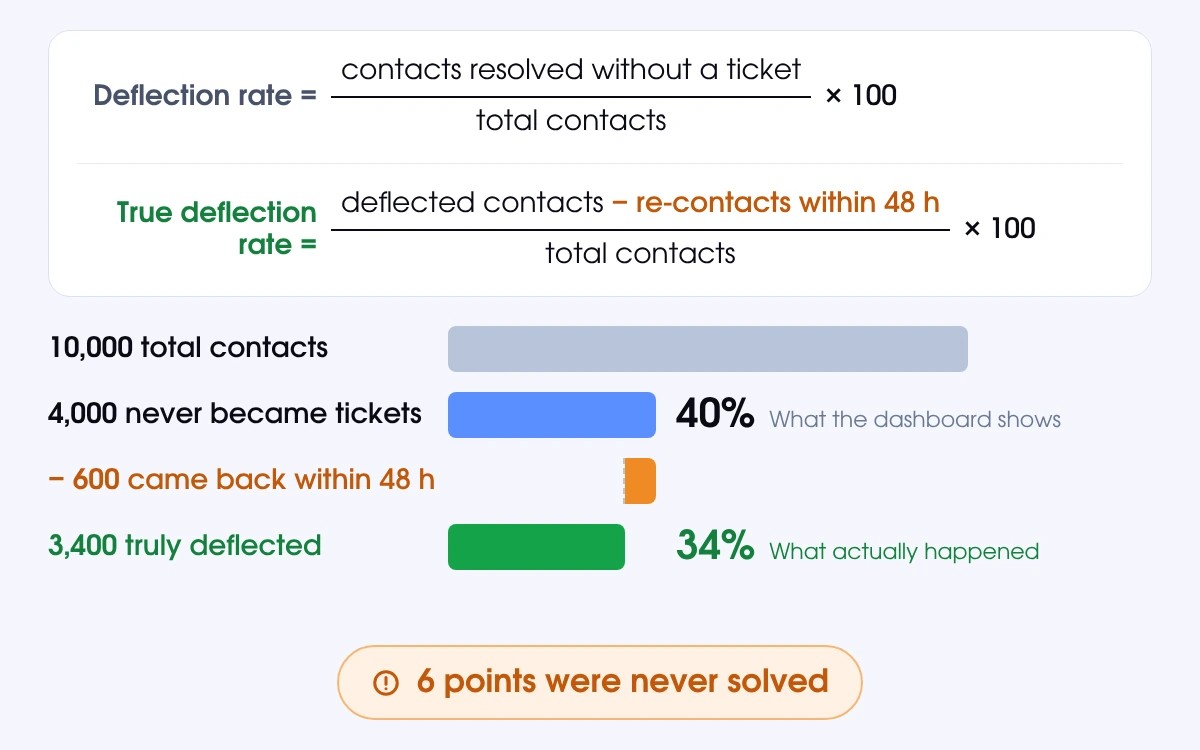
Deflection rate = (contacts resolved without a ticket ÷ total contacts) × 100
Take 10,000 monthly contacts, of which 4,000 never become tickets. That is a 40% deflection rate. It is simple, widely used, and generous.
The Formula Once You Subtract Re-Contacts
To keep the rate accurate, count a contact as deflected only if the customer does not come back about the same issue within 48 hours. A window of 24 to 48 hours without repeat contact is a common way to confirm that the problem was solved.
True deflection rate = ((deflected contacts − re-contacts within 48 h) ÷ total contacts) × 100
If 600 of those 4,000 customers come back, the real figure is (4,000 − 600) ÷ 10,000 = 34%. Six points of the original 40% were never solved.
Three Places the Number Quietly Inflates
Even a carefully defined deflection rate can drift upward without anyone changing a setting. The inflation rarely comes from bad data, but stems from small counting choices that favor deflection success on paper over the customer. 3 of them account for most of the distortion.
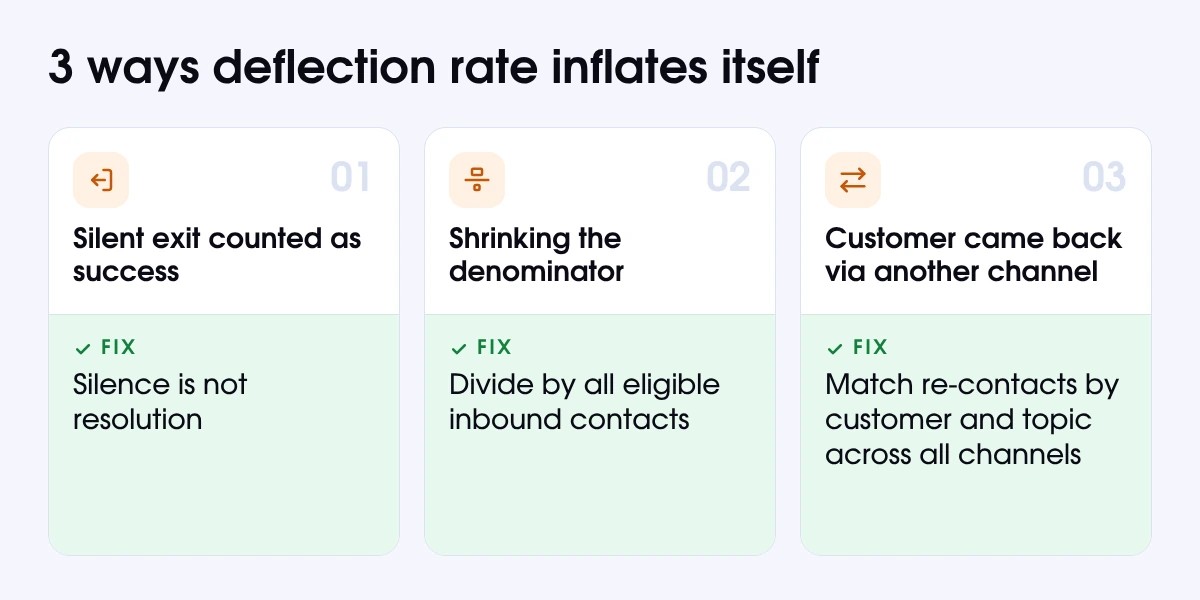
When Giving Up Is Logged as Success
A silent exit looks like a win. Intercom’s documentation, for example, counts an assumed resolution when a customer leaves without asking for more help, and deducts it only if they return to the same conversation. Silence does not mean high customer satisfaction.
Shrinking the Denominator
Counting only the conversations a bot chose to answer makes any rate look better, because the hardest requests drop out of the calculation. Divide by all eligible inbound contacts rather than just incoming tickets, including the ones the bot never answered.
The Customer Who Came Back Somewhere Else
A customer who fails in chat and then emails the same question disappears from a per-channel counter. Match re-contacts by customer and topic across every channel, including chat tools like Slack and Microsoft Teams.
AI Ticket Deflection Rate Benchmarks Worth Quoting
Any AI ticket deflection rate benchmark is only as good as its definition. Many published numbers mix deflection, containment, and resolution, and most come from vendors measuring how their own AI systems perform for their customers. Treat them as ranges to sanity-check your own data instead of chasing them as targets.
What Each Channel Really Absorbs
|
Channel |
Published range |
Where it breaks |
|
Self-service (help center, in-product) |
50–70% |
Stale articles; search that does not match customer wording |
|
Chat |
20–40% |
Intent misses; handoffs without context |
|
|
15–30% |
Multi-part requests, attachments, missing order details |
These figures are approximate. They come from surveys with different samples and dates, and your own results will shift with industry, ticket mix, and the quality of your self-service resources. Consistent figures for self-service deflection by channel are still scarce, so expect some variation between sources.
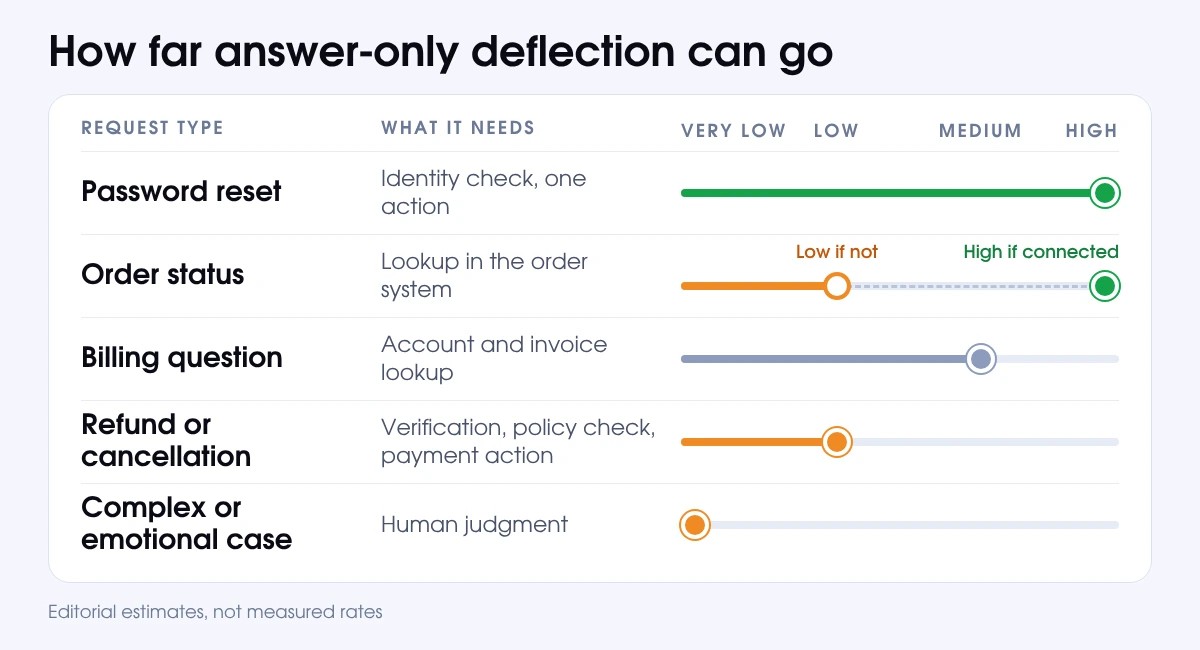
Deflection Ceilings by Request Type
The ceiling depends on what a request needs: an answer, a lookup, a verification, an action, or a human judgment call.
|
Request type |
What it needs |
Ceiling for answer-only deflection |
|
Password reset |
Identity check, one action |
High |
|
Order status |
Lookup in the order system |
High if connected, low if not |
|
Billing question |
Account and invoice lookup |
Medium |
|
Refund or cancellation |
Verification, policy check, payment action |
Low |
|
Complex or emotional case |
Human judgment |
Very low |
Ceilings are editorial estimates based on what each request requires. They are not measured rates.
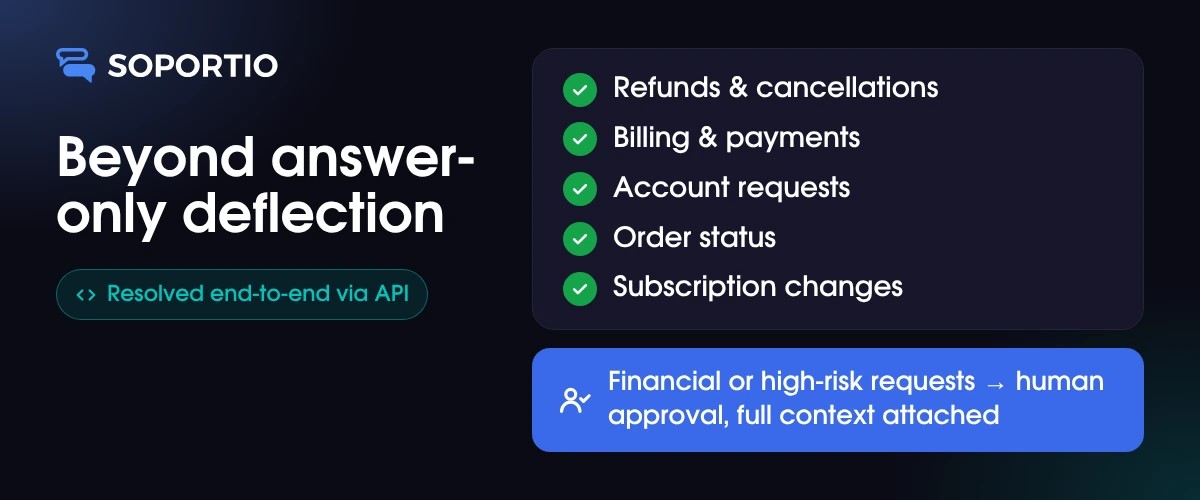
Soportio runs refunds and cancellations, billing and payments, account requests, order status, and subscription changes end-to-end through API actions. Financial or high-risk requests, such as a duplicate-charge claim, are routed to human approval with the full context attached.
Why Your Number Will Never Match the Vendor Deck
Vendors report resolution rates of 76% on average, and up to 80% for routine tickets at maturity. These figures are self-reported, built on each vendor's own definition of resolved and a different customer mix. Your own rate will track your ticket mix, your documentation, and your integrations with existing systems. Analysts forecast that AI will autonomously resolve 80% of common issues by 2029, but that is a forecast, not a benchmark.
What AI Ticket Deflection Changed, and What It Left Alone
AI ticket deflection changed the way instant answers are delivered, but has no impact on what an answer can do. Whether you run ticket deflection AI algorithms inside your helpdesk or use AI for customer support ticket deflection from a specialist vendor, that distinction explains most of the inconsistencies between the numbers on a vendor deck and the numbers on your dashboard.
The Part That Genuinely Got Better
AI-powered ticket deflection now uses natural language understanding to answer inside the conversation instead of pointing to a knowledge base article, and automated ticket deflection can read account data before it replies. Customer expectations have already moved ahead of the technology. A recent industry survey found that 74% of consumers expect 24/7 service because of AI, and 85% of CX leaders say customers will drop brands that cannot deliver first contact resolution. That pressure is the main driving force for AI customer service automation getting from a pilot project to a baseline expectation for support teams.
Your Documentation Sets the Ceiling, Not Your Model
An agent can give accurate answers only from what your documentation says and what your systems expose. Outdated refund policies, missing edge cases, and contradictory articles eventually become wrong answers. That is why some support ticket deflection AI engines inflate the numbers without solving anything. The fix starts with the content itself. A well-structured AI support knowledge base gives the agent one accurate source to answer from, instead of 6+ conflicting ones.
IT Ticket Deflection Reads Differently
IT ticket deflection applies the same idea to employees instead of customers. Internal requests such as password resets, access requests, software installs, VPN problems, and account unlocks are easier to automate for 4 reasons:
- familiar user
- clear identity
- fixed policies
- controllable systems
Failure also hides differently. An employee cannot churn, so a failed deflection shows up as lost working time and higher operational costs rather than a cancelled plan.
The Point Where Deflection Runs Out
If you ask companies that have adopted ticket deflection some time ago, you will probably hear the same piece of advice – leave refunds, disputes and account access to people. It may work fine for a bot that can only talk. But deflection simply runs out of road when a customer needs something done, not just explained. That usually happens in 3 cases.
Requests That Need Money Moved
A refund isn't a question. It's a task. A help center article or self-service portal can explain your policy, but it can't send the money, cancel the subscription, or update the customer's record. So, the customer reads the explanation, still has no refund, and writes back. The ticket you thought you deflected is open again, adding to your support volume.
Requests That Need Something Checked First
Before anyone changes an email address or releases an order, they need to know who is asking and whether the request is allowed. That means looking up the customer's billing data and checking your policy rules. An article or a bot that only answers can't do that. So, the customer gives up on the self-service tools, opens a ticket, and waits for support staff to do the check by hand.
Requests That Need a Judgment Call
Some support requests don't fit any rule, e.g., a goodwill exception, a disputed charge, an upset customer, or a tangled request. A script has nothing to apply, so it can only repeat itself. These are also the cases that decide whether a customer stays. According to Zendesk’s CX Trends 2026 report, 85% of CX leaders say customers will leave a brand that fails to resolve an issue on first contact.
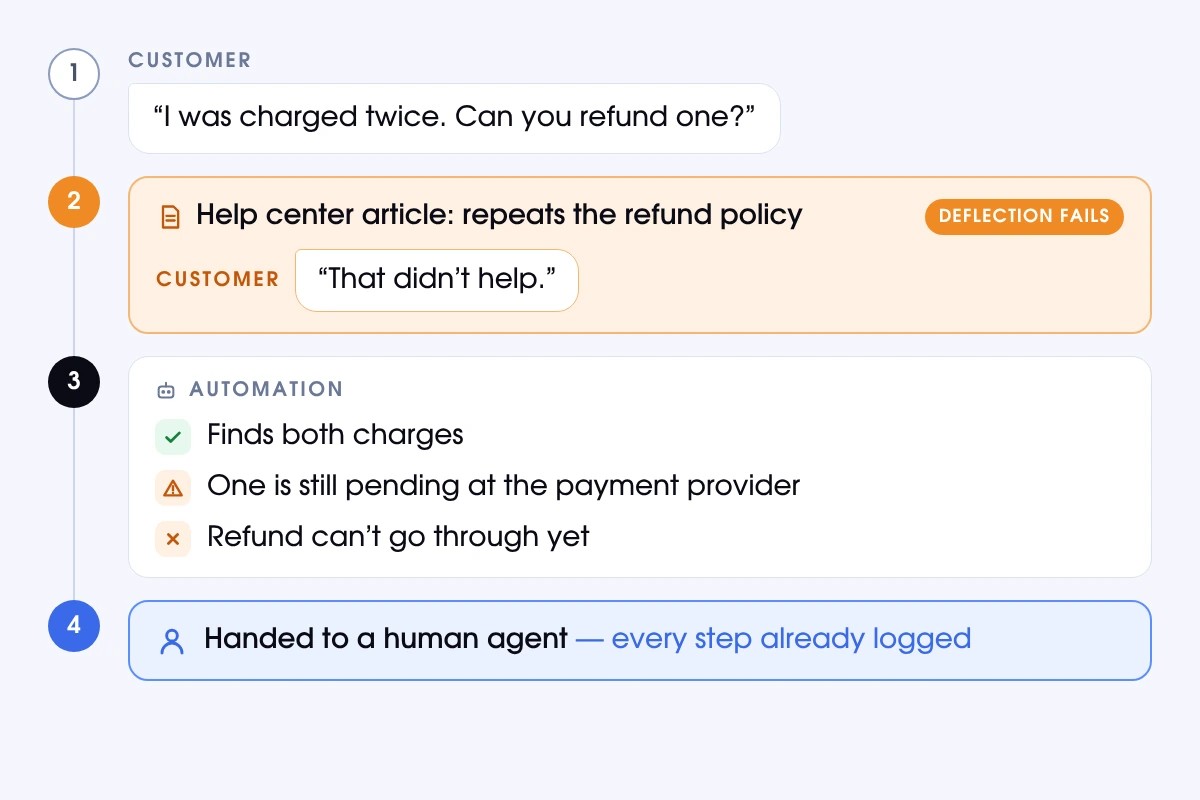
A customer writes: "I was charged twice. Can you refund one?" The help center article just repeats the refund policy, so the customer replies that it didn't help. The automation does find both charges, but one is still pending at the payment provider, so the refund can't go through. A human agent picks it up with every step already logged.
Ticket Deflection vs. Resolution: Two Numbers, Two Stories
When juxtaposing ticket deflection vs. resolution, we should be careful, as they refer to different concepts. Simply put, ticket deflection refers to keeping a customer away from a human agent, which doesn’t always result in solving their problem. Resolution tells you how many of the customer issues were actually fixed. That is why ticket deflection matters only when paired with resolution. You need both numbers on your dashboard.
What Each Number Is Actually Counting
Deflection counts the requests that never reached a human agent. Resolution counts the problems that were solved and stayed solved. The two can drift far apart because a deflected customer may come back a day later, escalate in a worse mood, leave a bad review, or even stop using the product. To confirm a resolution, check for customer feedback, a completed workflow, a closed loop with the billing system, or no repeat contact within a day or two.
The Only Version of This Your CFO Reads
Finance does not fund sessions. It funds solved problems, so express the result as cost per verified resolution. Once you have that number, you need to work out how to calculate the ROI of AI in customer service and learn whether the automation delivers true cost savings.
Automating the Categories Everyone Tells You Not To
Most teams keep refunds away from automation because when a bot gets money-related processes wrong, the results can be costly. Fortunately, you can have a more positive experience if you set clear rules and restrictions for an AI-powered ticket deflection to follow.
Refunds: What Has to Be True Before You Automate
- Verified payment. The charge exists in your billing system, belongs to this customer, and hasn't been refunded already.
- Eligible request. The request falls inside your policy window and meets your refund rules.
- Limited amount. Small, routine refunds go through automatically. Larger ones wait for a person to approve them.
- Complete record. Every action is logged with the data behind it, so you can review it later and reverse it if needed.
Billing Disputes and Account Access: Where the Line Moves
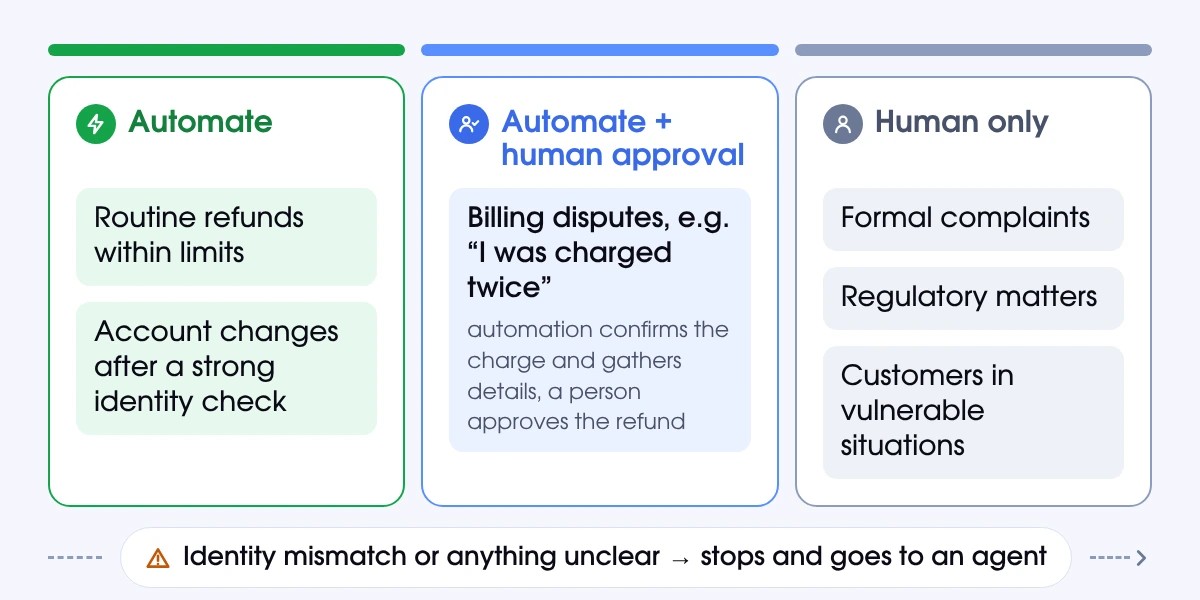
Disputes are different because they involve more money and more risk. Take a message like "I was charged twice." The automation can confirm that the duplicate charge is real and gather the details, but a person should approve the refund. Account access works the other way. When the identity check is strong, a confirmed owner can make a routine change on their own. If anything doesn't match, the request stops and goes to an agent.
What Still Stays Human
Such cases as formal complaints, regulatory matters, and customers in vulnerable situations should always stay with a person. It is the wrong path, trying to remove people from support operations completely. It is more important to put them where their judgment matters most, and to hand them the full story from the start, so they never have to ask the customer to repeat it.
How Soportio Turns a Deflected Session into a Resolved Ticket
The majority of AI tools for support are limited to response functions. Soportio is a flexible solution that covers the entire workflow, and one of its key benefits is that it acts instead of only answering. Moreover, thanks to a managed approach, Soportio is constantly improved so that it fully aligns with your present-day challenges, needs, and customer support strategy.
What Changes When the AI Can Act
Soportio is a support automation service that carries a request from first message to outcome. It analyzes the ticket to understand customer intent and gathers the customer context, applies your business rules, and executes the action through API calls, such as a refund, a cancellation, or an account update. Then it closes the ticket or hands it to your team with the full conversation attached. Financial or high-risk actions require human input.
Running on the Helpdesk You Already Use
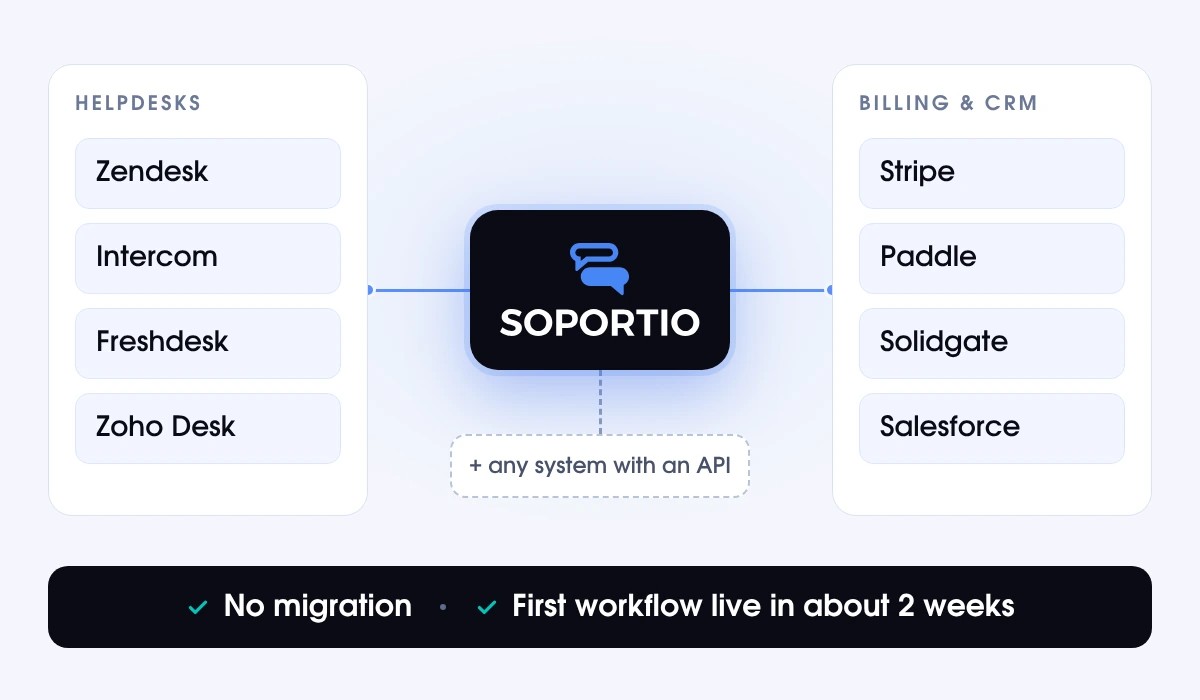
You don’t have to migrate your established workflow or replace your existing tools. Soportio reads and writes through Zendesk, Intercom, Freshdesk, Zoho Desk, and other helpdesks. Besides, it connects to billing and CRM systems, including but not limited to Stripe, Paddle, Solidgate, and Salesforce. Any system with an API can be connected. The Soportio team builds the first workflow, validates it on real support scenarios, and then launches it in about 2 weeks once access and data are provided.
Where It Is Not the Right Fit
Some cases, like complaints and regulatory matters, still belong to your team, as was mentioned above. Soportio doesn’t try to replace the people who handle them. It takes care of the routine requests, which leads to lower operational costs and gives human experts more time for the cases that need them.
Raising Deflection without Faking It
To move toward effective ticket deflection and a better deflection rate, you need to determine what has gone wrong and fix it.
- Agree on one definition. Decide what counts as deflected, include the 48-hour re-contact rule, and use the same definition in every report.
- Track 3 numbers together. Look at deflection, resolution, and re-contact rate side by side, plus CSAT from customers who were deflected.
- Start with your top ticket types. Tag a month of tickets by reason, then rank them by volume and risk before you decide what to automate.
- Fix the content behind them. To improve self-service, fix outdated articles and fill in missing edge cases. They cap every result of AI-powered deflection, no matter how good the AI is.
- Automate step by step. If you're wondering how to automate customer support without breaking things, begin with low-risk, high-volume requests and add actions once those work.
- Review failures every week. Read the conversations that ended in a repeat contact or an escalation, then update your rules and content with what you learn.
- Keep the human option easy to find. Make sure it is straightforward for customers to get in touch with a real person. Otherwise, serious client claims will be left unresolved.
Choosing the Best AI for Support Ticket Deflection: 5 Questions
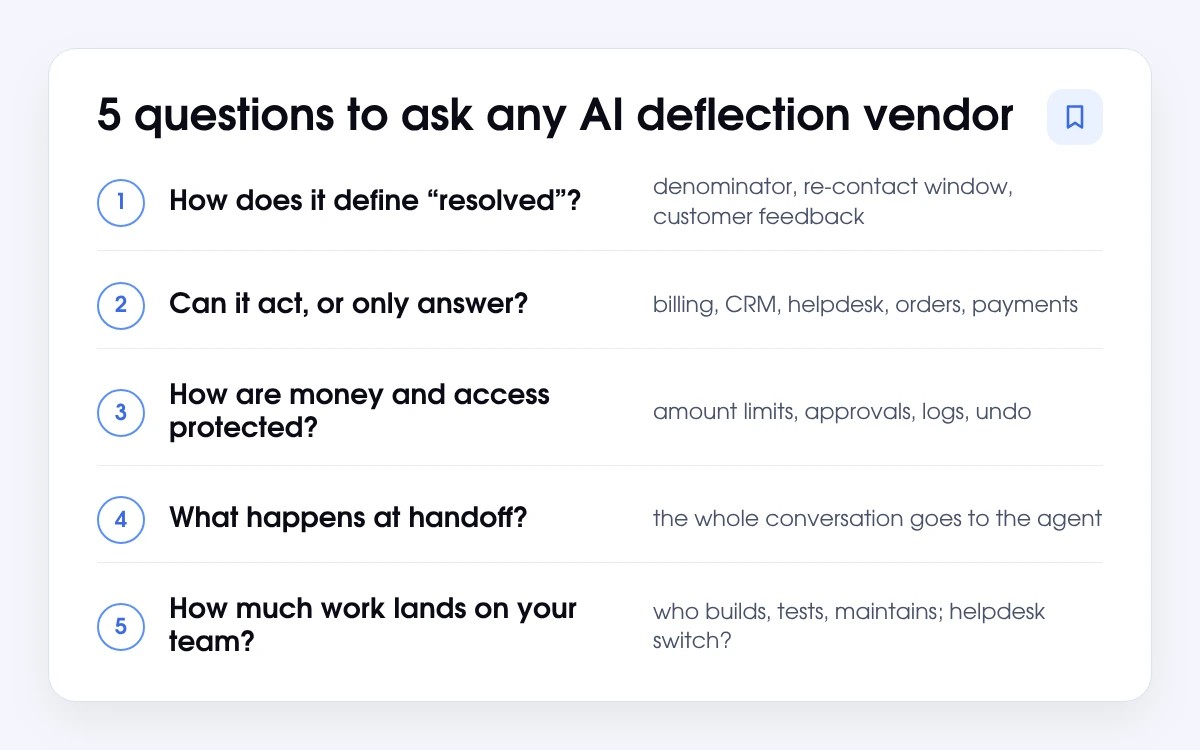
It is hardly possible to name a single best AI for support ticket deflection, as a successful deflection strategy depends on a company's requirements and priorities. So, when you look at AI-powered ticket deflection for support teams, answer these 5 core questions.
- How does it define "resolved"? Ask what it divides by, how long it waits for a repeat contact, and what customers say about the conversations it closed.
- Can it act, or only answer? Find out which actions it can run in your billing system, CRM, helpdesk, order management tool, and payment provider.
- How are money and access protected? Look for amount limits, approval steps, activity logs, and features to undo mistakes.
- What happens at handoff? A person should get the whole conversation with the smallest details.
- How much work lands on your team? Ask who builds, tests, and maintains the automation, and whether you would have to switch helpdesks.
We created Soportio to meet these 5 basic tests and even offer you some advanced functionalities. It runs inside the helpdesk and billing tools you already have, asks a person before it does anything risky, hands your team the whole conversation whenever a case needs them, and can be customized for your unique processes.