Customer Service Automation: A Decision Guide for Support Leaders
In this article
Key Takeaways
- Customer service automation spans from simple routing rules to AI agents that execute actions across connected systems.
- Most B2C queues can realistically automate 40–80% of tickets, depending almost entirely on the ticket mix.
- Deflection rate misleads because customers who give up or switch channels are still counted as successful resolutions.
- Automation fails most often due to undocumented business rules, missing API access, and treating deployment as a finished project.
- Since August 2026, the EU AI Act requires businesses to clearly inform customers at the start of every AI interaction.
Ticket volume grows, headcount cannot keep up, and cost per contact does not fall on its own – this is the problem that customer service teams at B2C companies face regularly. Customer service automation is a reasonable way out. Whether you call it automated customer service, customer support automation, or customer care automation, you receive the same result when software resolves customer inquiries end-to-end without a human touching each one.
This guide covers the key aspects of how automation works at the workflow level, which parts of your queue are automatable, what the technology stack involves, and how to evaluate whether to build, buy, or pay for the outcome. If you’ve been told automation of customer service can handle 90% of your tickets, this information will help you figure out whether that’s true for your queue, and what the other 10% will cost you. Treating this as a core part of your customer service strategy is the first step toward a measurable improvement in both efficiency and customer experience.
What Is Customer Service Automation? Definition and the Names It Goes By
Customer service automation is the use of software (rules, machine learning, and artificial intelligence) to handle customer queries without a human agent completing each step. The range is wide, including a routing rule that sends billing tickets to the billing queue, an AI agent that reads a refund request, checks the charge in your billing system, issues the refund, and closes the ticket without a human agent involved.
The names used in job descriptions, vendor pitches, and RFPs overlap almost completely. Automation in customer service, automation of customer service, customer service and support automation describe the same processes. The variation is mostly which word the author put first.
They all refer to the software replacing or assisting human customer service agents on tasks that follow a repeatable pattern.
Three Generations Still Being Sold Today
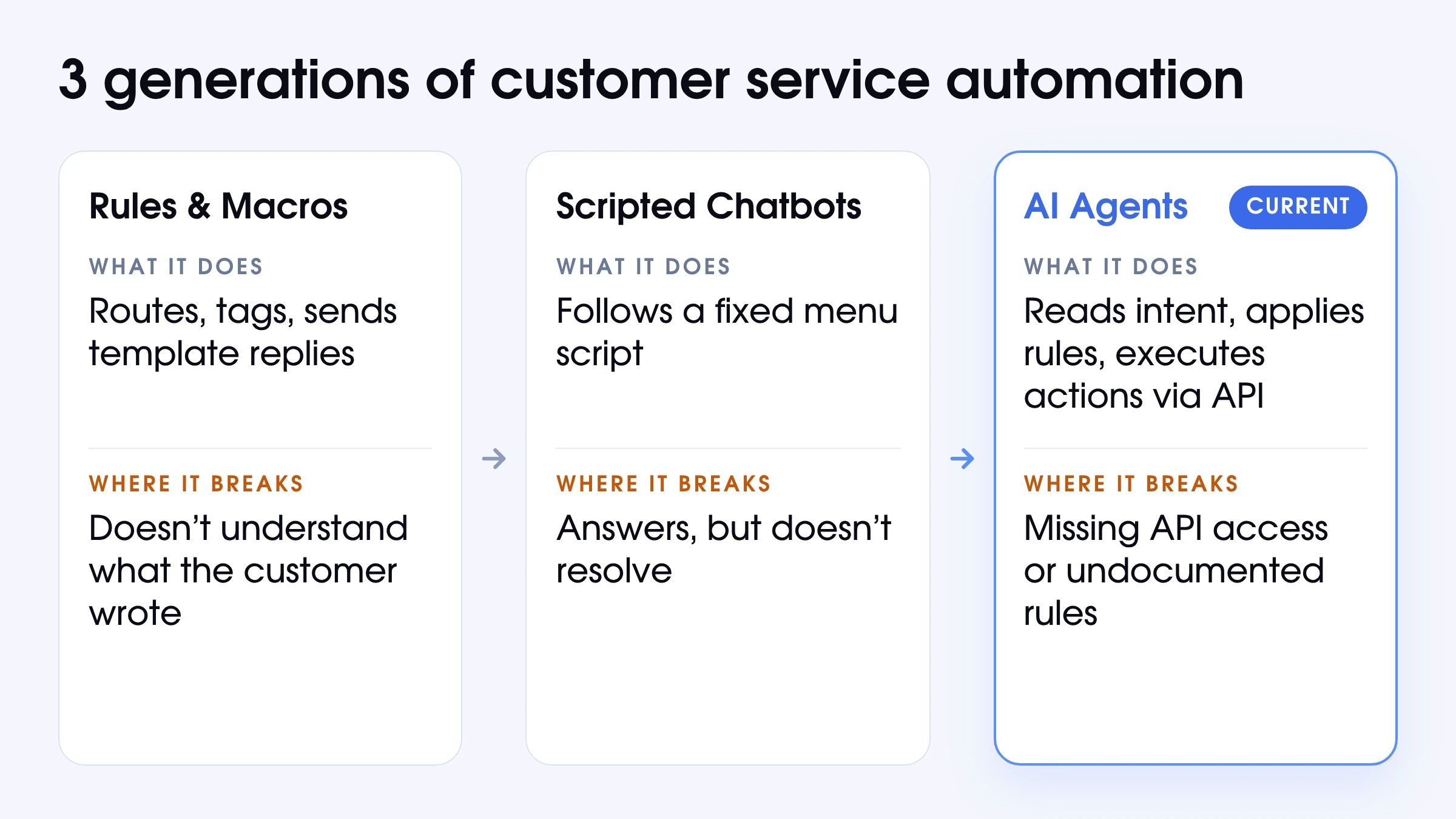
The market sells 3 distinct technologies under the same banner.
Rules and Macros
Thіs is the oldest layer. A trigger fires, e.g., ticket tagged “billing,” customer region “EU”, and a rule routes it, assigns it, or sends a template response. Macros let support agents apply a canned reply with one click. This layer is still worth having. It handles intelligent routing, tagging, and auto-close for obvious spam without any AI. Still, it cannot understand what the customer actually wrote, or act on it.
Scripted Chatbots
Decision-tree bots, sometimes called virtual assistants, prompt the customer to pick from a menu and follow a fixed script. They deflect well for a narrow FAQ set like “Where’s my order?” with a tracking link attached, and they may offer basic self-service options such as order lookups and password resets. They break when a customer phrases a question outside the script, or when two things are true at once: “I want a refund, and I want to cancel.” They answer, but they do not resolve.
Agents That Can Touch Your Systems
This is the current generation. An AI agent reads what the customer wrote, identifies the intent (or multiple intents), applies your business rules, and executes real actions, be it issuing a refund, updating a subscription, or changing an account record, through API connections to your systems. The ticket is then closed or escalated with full context. According to Gartner, agentic AI will autonomously resolve 80% of common customer service issues without human intervention by 2029, alongside a 30% reduction in operational costs. AI agents can manage complex customer queries and simple customer queries within the same workflow.
Deflected or Resolved: Not the Same Number
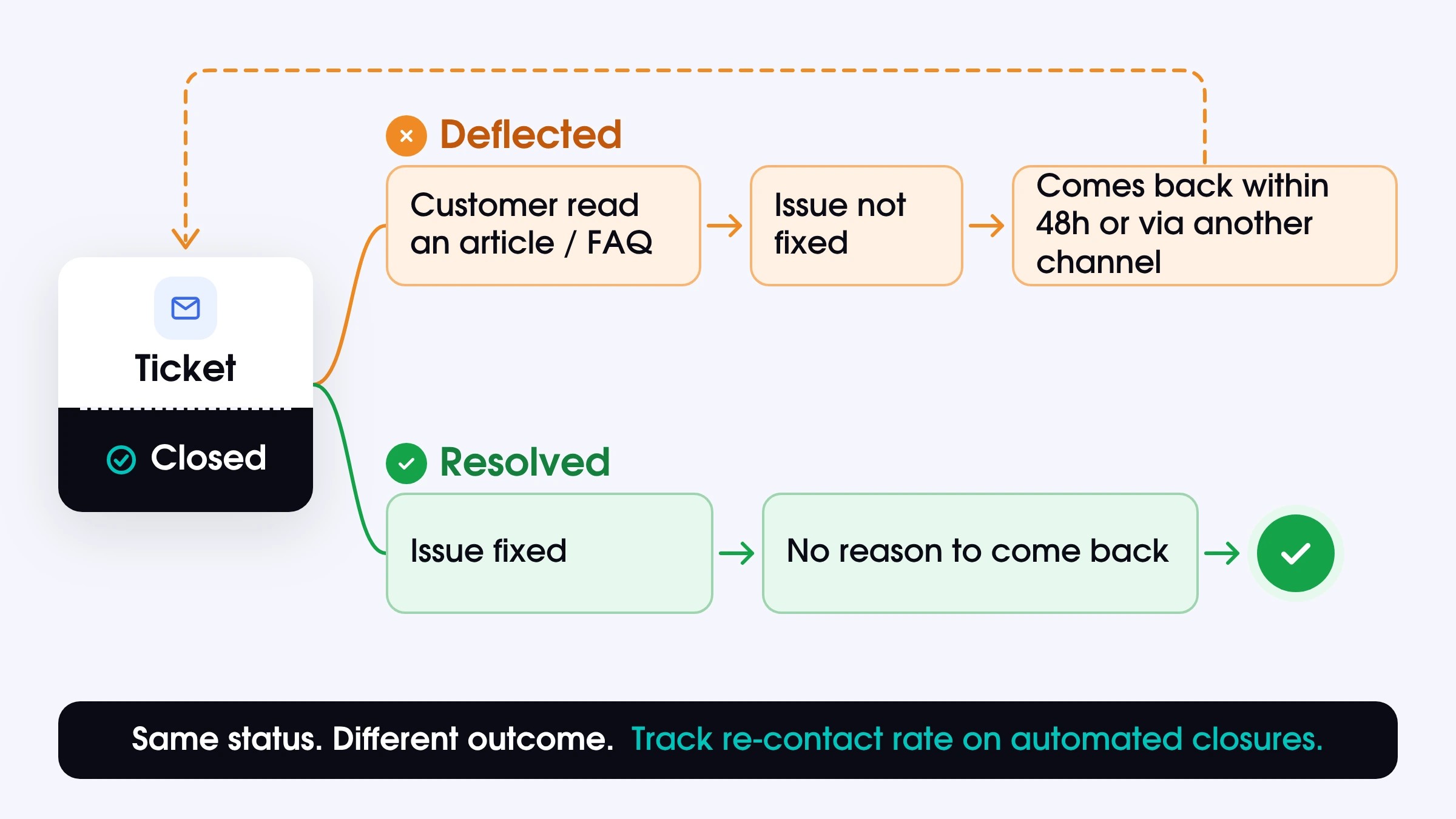
A deflected ticket and a resolved ticket can share the same closed status in your dashboard. They do not share the same outcome for your customer or your business.
Deflection stops an inquiry from reaching a human. For example, the customer may use a help article, browse a self-service knowledge base, or find the needed information in the FAQ section. That is not inherently a problem, but it is not resolution. Resolution means the underlying issue was fixed and the customer had no reason to come back. These 2 concepts have the same closed status but entirely different meaning.
The cleanest way to tell them apart in your own data. Pull re-contact rates for tickets closed by automation. A customer who reopens the same ticket within 48 hours, or reaches out again about the same issue through a different channel, was deflected, regardless of what the status field said. When customers express frustration by contacting you repeatedly about the same issue, that is a strong signal of deflection. Once you start measuring that way, ticket deflection vs. resolution is no longer a semantic debate and becomes a line on a chart you can act on.
What Happens Between the Request and the Reply
Most people think of automation in customer service as a single moment. A ticket comes in > a reply goes out. In practice, several things have to happen correctly between those two points. If anything goes wrong in automation, it almost always happens somewhere in the middle.
The Five Stages of One Automated Contact
Customer service and support automation is a sequence of decisions and operations. The failure rate at each stage compounds. Here is what runs on every ticket a modern system handles:
- Intake. Whether customer service interactions come through multiple channels (email, live chat, social media, or phone), the system identifies the source, normalizes the format, and queues it for processing. Consolidating communication channels at this stage is critical for a satisfying customer service experience.
- Classification. The system reads the message, detects intent (sometimes multiple in one message), and pulls relevant context (customer history, account status, previous tickets, order records). At this stage, it is possible to use predictive analytics to anticipate the type of request and reduce human error in categorization.
- Decision. Business rules are applied. Is this customer eligible for a refund? Is the charge within the policy window? Does the risk level require human approval before any action is taken?
- Execution. If the decision is to act, the system makes API calls to the relevant systems: billing to process the refund, CRM to update the account record, helpdesk to post the reply and update ticket status. At this stage, automated notifications are sent to confirm the action taken.
- Close or escalate. If the workflow is completed, the ticket closes, and the customer is notified. If any step hits a limit due to missing data, a risk threshold, or an edge case outside the rules, the ticket moves to a human agent with the full context attached.
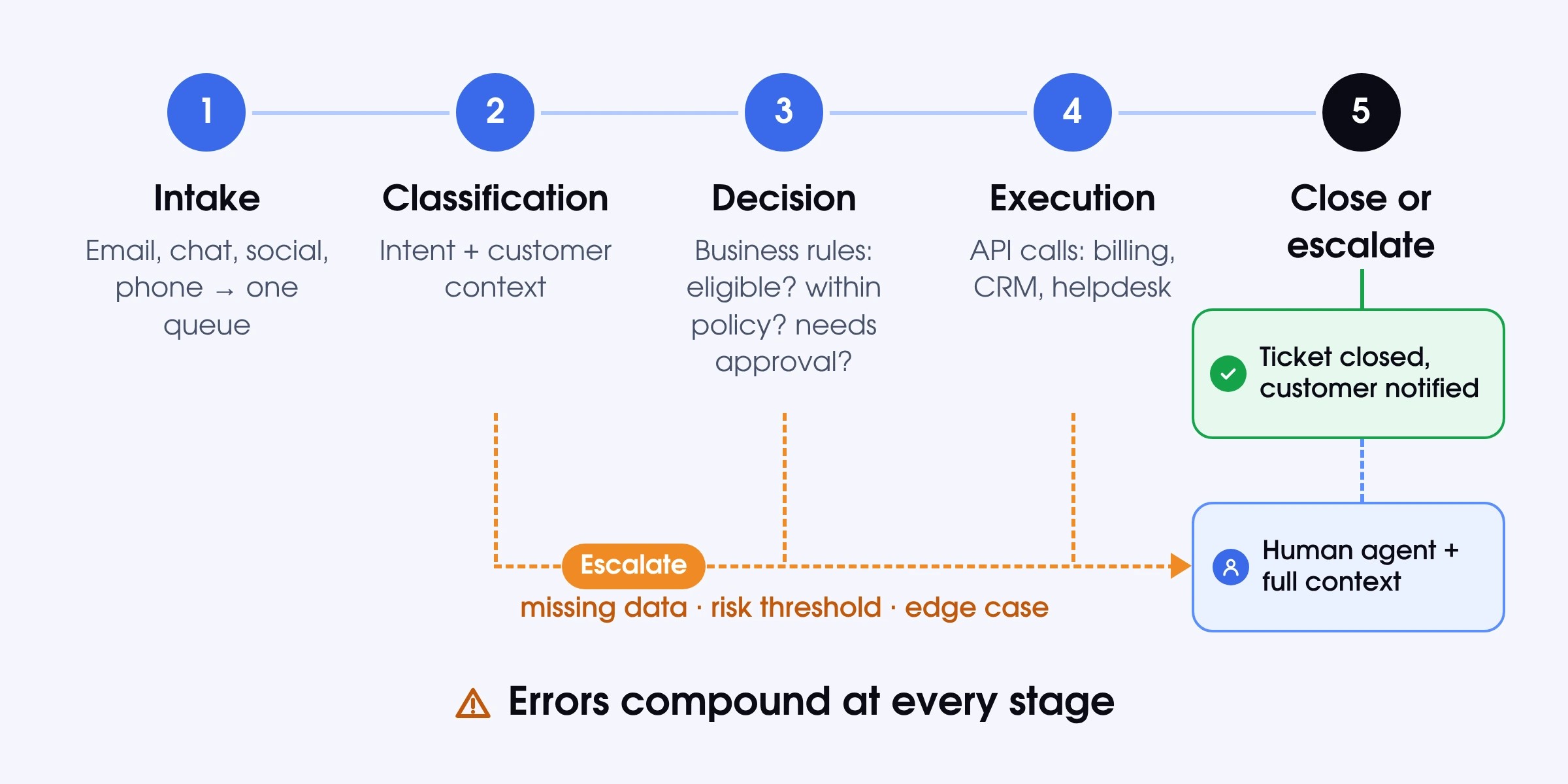
Speed matters less here than reliability at each stage. A fast customer service automation AI system that executes the wrong action, or escalates without context, costs more than it saves.
Customer Service Automation Technology in Plain Terms
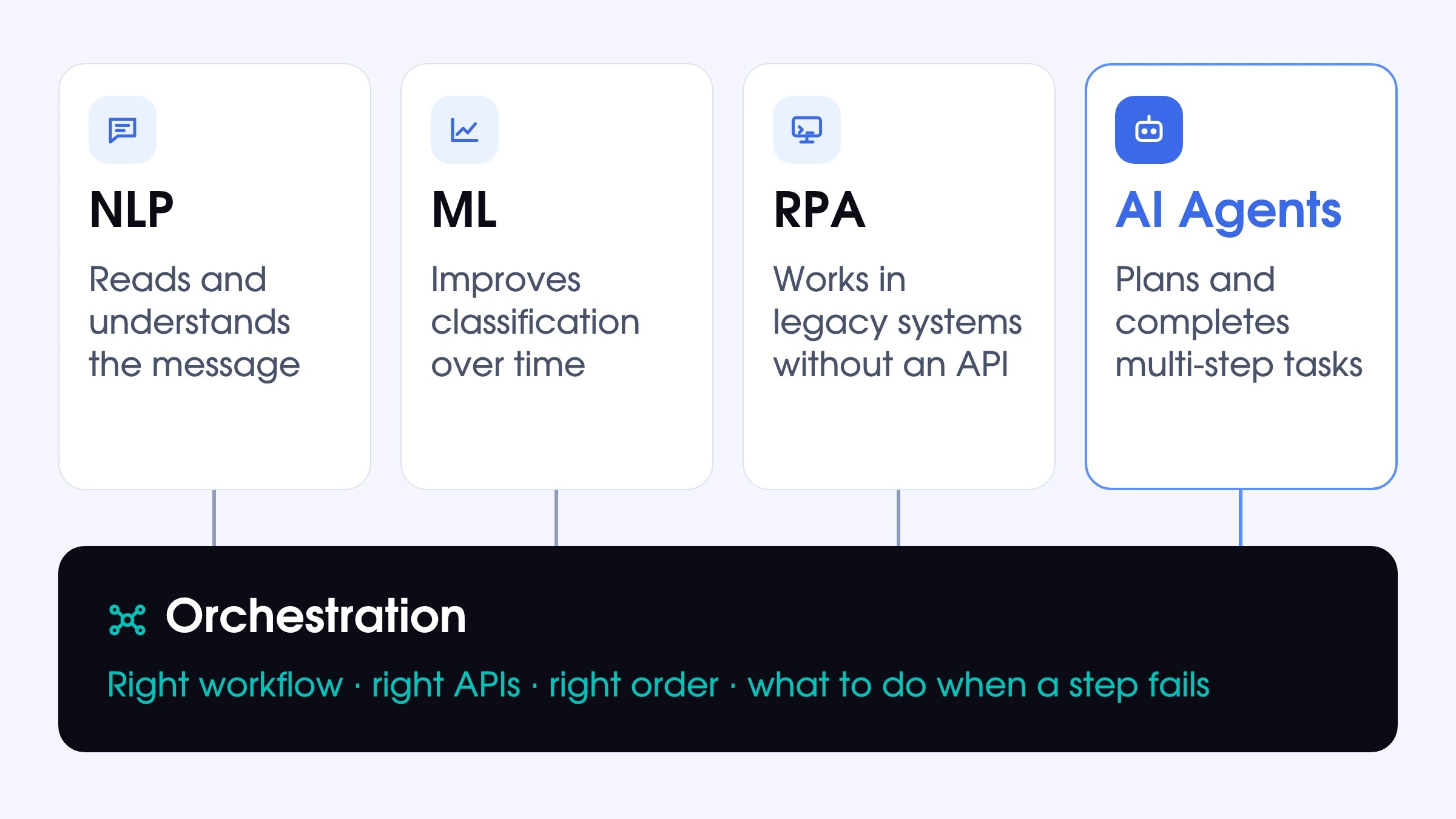
The phrase “customer service automation technology” typically arrives in vendor decks with slightly obscure acronyms. Let's clarify what each of them stands for.
- NLP (Natural Language Processing) reads what customers write and extracts meaning. It handles spelling variations, informal language, and the difference between “cancel my plan” and “pause my subscription.”
- ML (Machine Learning) improves classification accuracy over time by learning from how tickets were handled earlier. More data and human feedback corrections make intent detection more reliable.
- RPA (Robotic Process Automation) executes repetitive tasks in software interfaces, particularly in legacy systems that expose no API. It is increasingly replaced by direct API integration for speed and reliability.
- AI Agents plan a sequence of steps, use APIs, knowledge bases, and data lookups, and complete multi-step customer service tasks without being told exactly what to do at each step. These are the most advanced automated customer service tools available today.
- Orchestration connects the above, routing the output of classification into the right workflow, calling the right APIs in the right order, and deciding what to do when a step fails. This layer is invisible in most vendor demos and consequential in every production deployment.
How Much of Your Queue Is Actually Automatable
For most B2C customer service operations, the realistic automation range is 40–80%. The number depends almost entirely on ticket mix.
|
Request Category |
Typical Queue Share |
Automation Layer |
Ceiling |
Economics |
|
Order/shipping status |
15–25% |
Rules + AI agent |
85–95% |
Strong: high volume, low decision complexity |
|
Account/password |
5–15% |
Rules + AI agent |
80–90% |
Strong: clear eligibility, fast API actions |
|
Subscription changes |
10–20% |
AI agent |
75–85% |
Strong if billing API connected |
|
Refunds & cancellations |
10–20% |
AI agent |
65–80% |
Good: depends on policy clarity and risk thresholds |
|
Billing questions |
10–15% |
AI agent |
60–75% |
Moderate: context-heavy, some need human judgment |
|
Technical troubleshooting |
10–20% |
AI (partial) |
15–35% |
Weak: diagnosis rarely follows fixed rules |
|
Complex complaints |
5–15% |
Human |
10–20% |
Not viable: empathy and judgment required |
|
Legal/regulatory / fraud |
2–8% |
Human |
0–10% |
Not viable: compliance requirements apply |
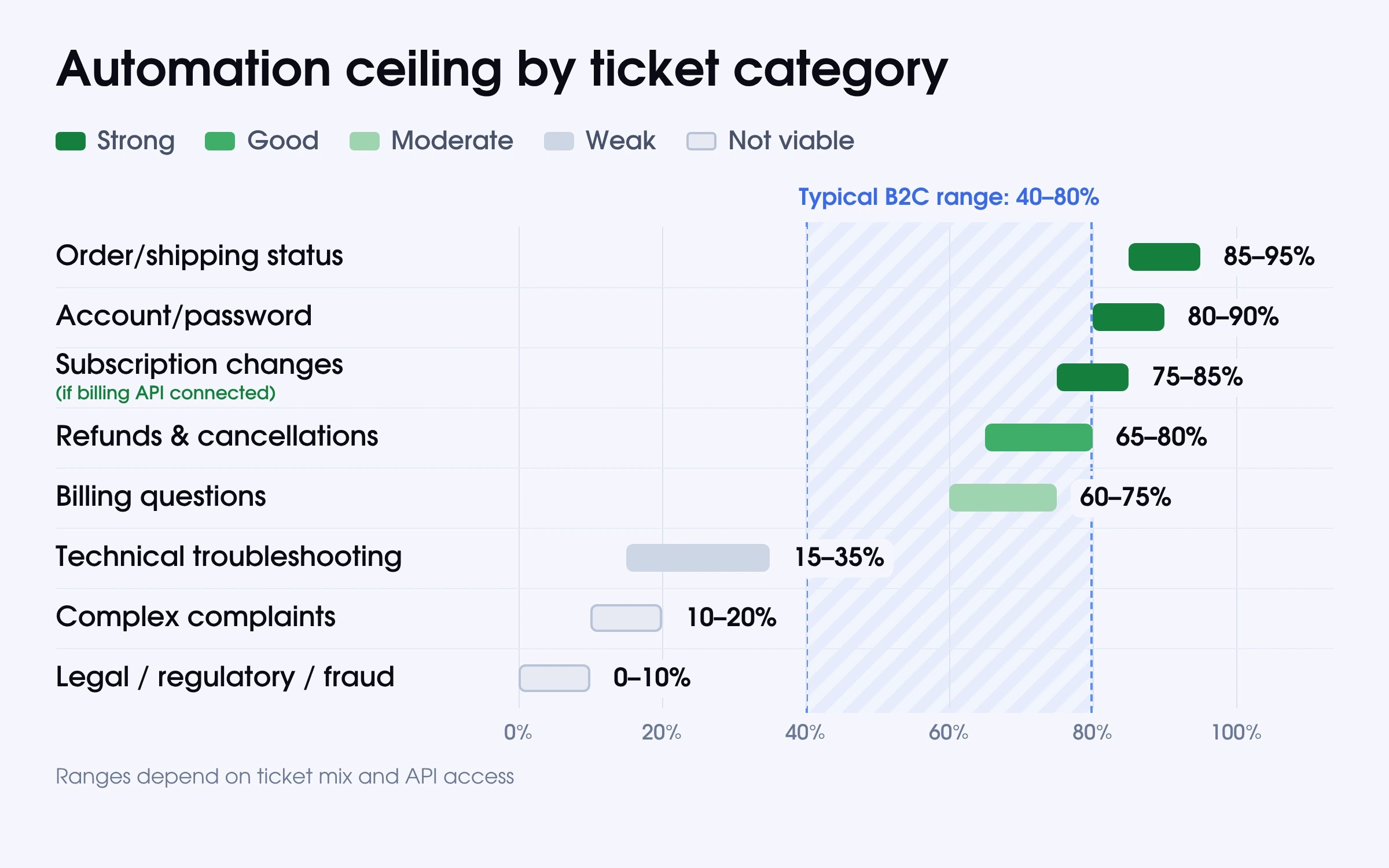
A queue dominated by order status and account questions can reach 80–90% automation. A queue heavy with technical troubleshooting and escalated complaints will land significantly lower.
The ceiling also depends on your systems. Automation can only act on data that is accessible. A refund workflow touching three systems, two of which have no API, is not a 70%-ceiling category. It is a manual workflow until integrations are in place. Audit your support ticket management system and billing stack before counting any category as automatable.
4 Conditions a Category Has to Meet
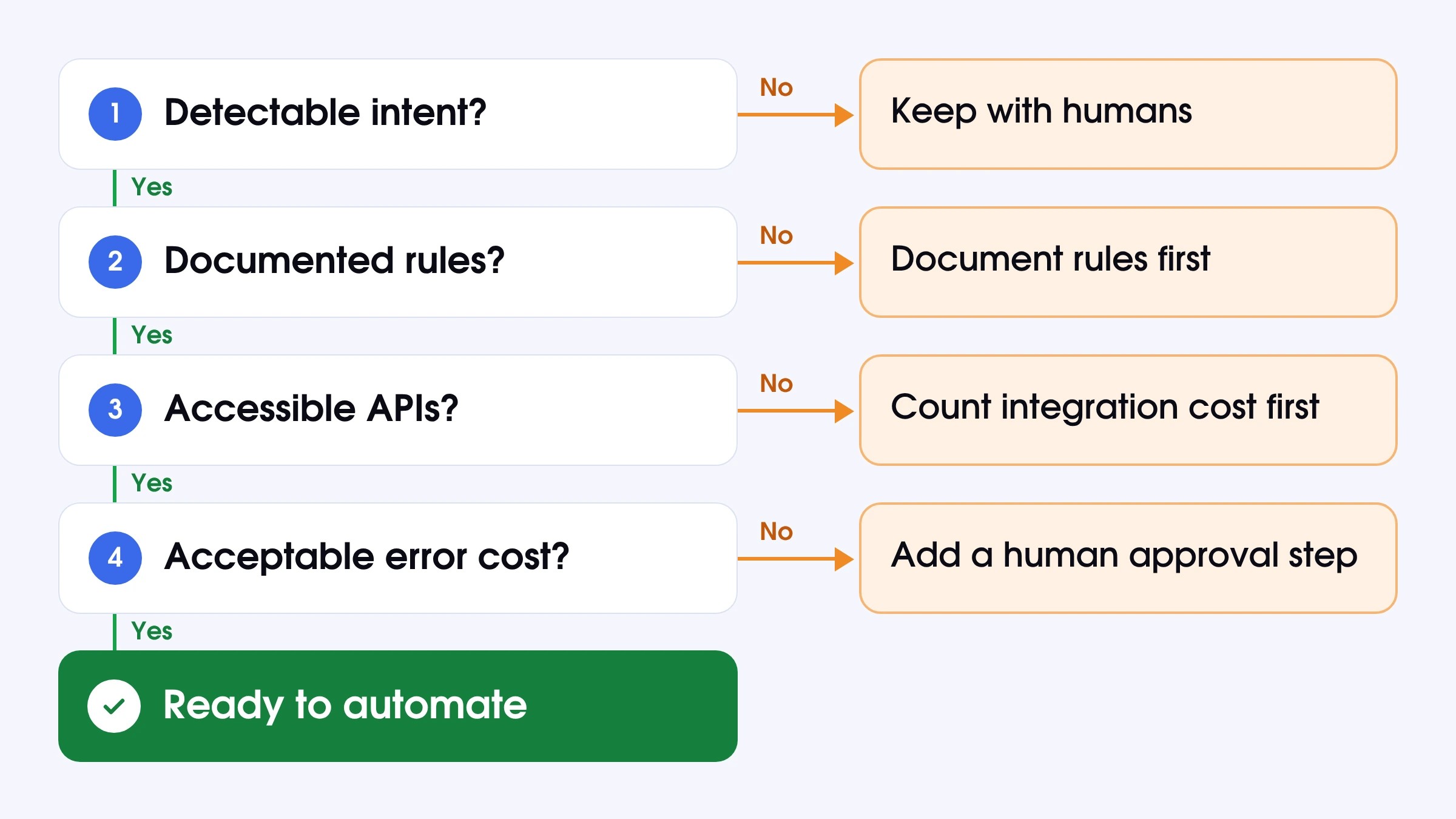
Before treating a ticket type as automatable, check the following.
- Detectable intent. Ambiguous or highly variable requests stay with humans until classification accuracy is high enough to act on.
- Documented rules. If the right action requires judgment that no policy covers, automation cannot substitute for it.
- Accessible APIs. If a system doesn’t expose one, count the integration cost before counting the category as automatable.
- Acceptable error cost. Low-stakes mistakes are manageable. Financial actions need a human checkpoint or strict eligibility logic before execution.
Categories That Stay with People
Some ticket types belong with human customer service agents regardless of how AI automation for customer service is.
- Emotionally charged complaints when customers express frustration and need empathy and personalized support that only a human can provide.
- Legal, regulatory, and fraud cases where documentation, judgment, and liability are all in play.
- Complex technical diagnosis where the resolution path is unknown until multiple questions are answered
- Situations with missing or unreliable context when acting on incomplete information create risk.
Customer Service Automation Examples, One Line Each
These customer service workflow automation patterns run in production today:
- Refund request: eligibility checked against billing records, refund issued via billing API, confirmation sent, ticket closed.
- Subscription cancellation: intent confirmed, cancellation processed, retention logic applied if configured, CRM updated.
- Plan upgrade or downgrade: new plan applied, prorated billing calculated, customer notified.
- Order status inquiry: order ID retrieved, status pulled from logistics system, tracking link sent.
- Account/password reset: reset link triggered from auth system, confirmation reply sent.
- Duplicate charge: transaction history pulled, duplicate identified, refund issued or flagged for review if above threshold.
- Policy question: relevant policy retrieved from customer support knowledge base, response generated, ticket closed.
- Scheduling appointments: customer selects available slots, gets automated notifications, and calendar is updated.
Each pattern works only when the underlying systems are connected, and the rules are documented.
The Benefits of Customer Service Automation, With Numbers Attached
Automation in customer service impacts more than just cost per ticket. The most significant advantages of customer service automation only become visible once the system has been running for a few months.
Absorbing Volume without Hiring
The primary reason to introduce customer self-service automation is cost avoidance. Ticket volume grows with the customer base. Without automation, support headcount grows with it. With automation handling routine tasks, the same customer service team covers significantly more volume.
Kismia grew from hundreds to tens of thousands of tickets monthly through Soportio’s hybrid model. AI handles the repetitive volume; specialists cover every complex case.
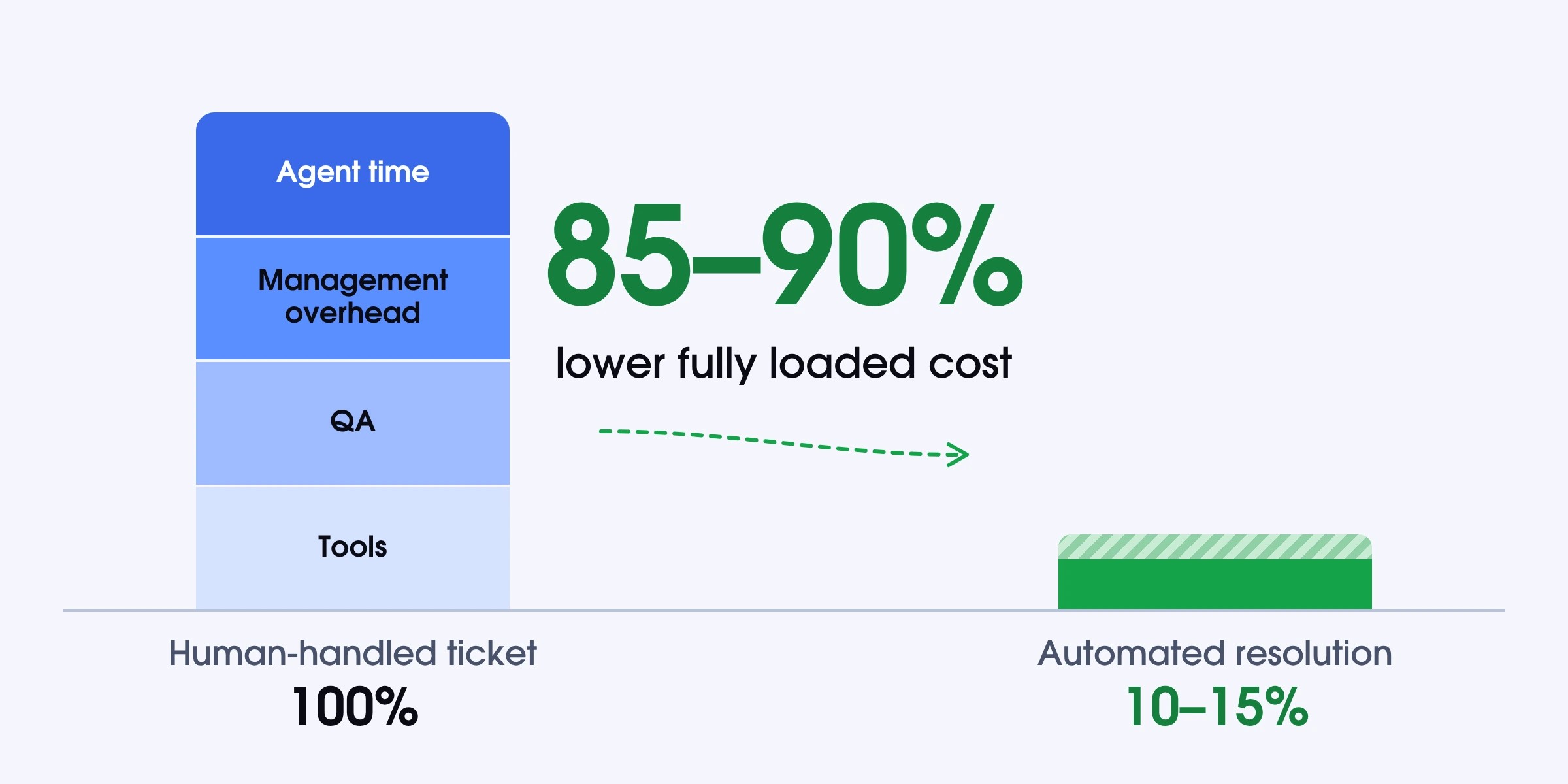
The loaded cost difference between a human-handled ticket and an automated resolution typically sits at 85–90%, once agent time, management overhead, QA, and tools are fully accounted for. At scale, that differential turns automation from a nice-to-have into a structural decision. Automating routine tasks frees up your team to focus on higher-value work that strengthens customer relationships and builds customer loyalty.
Replies That Do Not Wait for a Shift
An automated system does not have a response SLA tied to shift coverage. The ticket arrives > within seconds, the system reads it > retrieves context > and either resolves it or escalates it with context attached. There are no queues or delays when waiting for the morning team.
For B2C operations with a global customer base, this matters for CSAT even before the cost savings appear. Customers who contact support at 10 PM do not care about time zones. They care whether their issue gets handled. Meeting customer expectations for instant responses across multiple channels is one of the clearest ways automation improves customer service.
The Same Answer Every Time
Human agents apply policy inconsistently, namely because edge cases may be ambiguous and exceptions accumulate over time. At scale, that variance shows up as reopened tickets, escalations, and chargebacks. AI customer service automation systems apply the same rule to every eligible request without exception. If the policy says refunds within 30 days are approved, that is what happens every time without a manager auditing the queue.
By eliminating human error, automated tools maintain a consistent level of service quality across every customer service interaction. This consistency directly improves the overall customer experience and protects long-term customer relationships.
Where the Gains Fail to Appear
Some ticket categories look automatable on paper and underperform in practice. The issue has little to do with execution. When identifying the right action requires context that lives nowhere in your systems, the decision can’t be encoded into a rule.
Soportio sees this consistently across client projects. One project from August through October illustrated it well. 4 ticket categories kept falling outside what automation could reliably resolve:
- App Store and Google Play refunds
- disputed charges
- payments already in chargeback
- and product malfunction returns
The common feature among them all is ambiguity. App Store refunds are handled by the platform, not the billing system. A product malfunction return often becomes a goodwill decision that sits outside written policy. A disputed charge can be fraud or a family member’s unrecognized purchase, but the data rarely tells you which. A payment in chargeback has already moved past the point where standard handling applies. Automation can capture the details and route the ticket. The judgment still has to come from a person.
So, to ensure your customer service automation technology works perfectly, you need to capture the missing context upstream or keep a human in the decision loop while automation handles the routing service tasks around it.
What It Costs to Run
The number on a vendor’s pricing page is rarely the number you end up spending. There are other less obvious aspects to keep in mind.
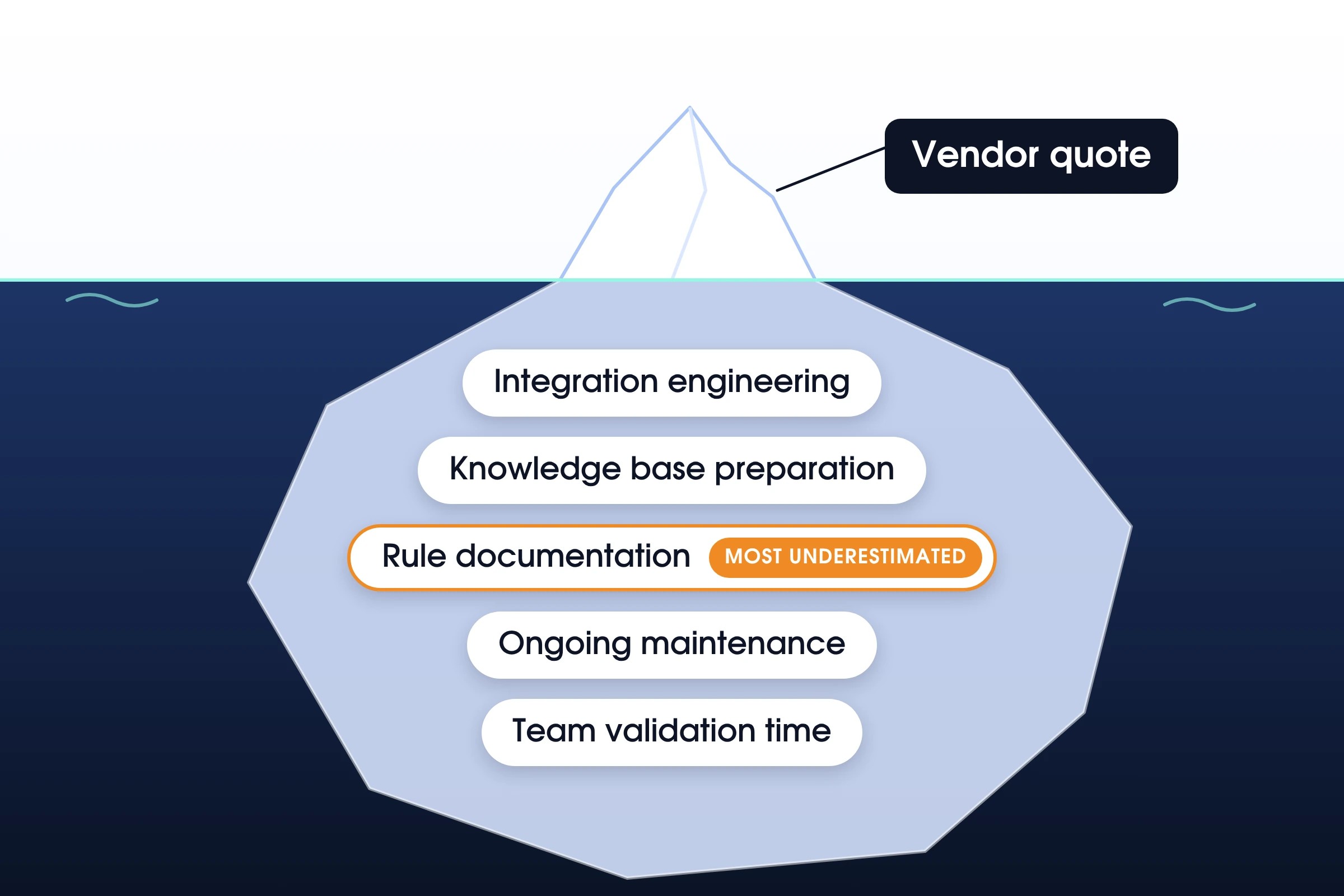
The Line Items Missing from Every Quote
When calculating the cost of running customer service automation, make sure to account for:
- Integration engineering. Connecting your helpdesk, billing, CRM, and internal systems requires API work. For standard platforms (Zendesk, Stripe, Salesforce), this is primarily configuration. For custom or in-house systems, it is development work on your team’s calendar.
- Knowledge base preparation. Automation that answers questions needs clean, current, accurate source material. If your self-service knowledge base has not been audited recently, build that time into the project plan.
- Rule documentation. Business logic that lives in agents’ heads (dos and don’ts, thresholds, the “we always do this for that segment”) needs to be written down before it can be encoded. This is consistently the most underestimated task in any automation project.
- Ongoing maintenance. Policies change, as well as products. APIs update. Every change in your operation potentially requires a workflow update. Factor in who owns that on an ongoing basis before signing.
- Team validation time. Before workflows go live, someone on your side reviews them against real ticket data. That is human agent and manager time.
How to Frame the Return
The return on customer service automation is the difference between the fully loaded cost of handling N tickets manually and the fully loaded cost of automating those same tickets, including all of the above over a defined period.
The most common mistake is using deflection rates as a proxy for resolution rates, then multiplying by agent cost. Deflected tickets that reopen, return through another channel, or result in chargebacks carry a cost that never appears on the automation dashboard. It’s important to monitor customer feedback alongside operational metrics. A rigorously designed ROI of customer service automation model can surface those before you sign, not after you’ve already committed to a vendor.
AI in Customer Service Automation: What It Moved
The arrival of large language models is the most significant technical development in customer support automation in the past decade. Most changes in the category since 2022 trace back to how machines understand and process language.
What Changed with Language Models
Before large language models, intent classification was a keyword-matching problem. “Refund” triggered one action. “I want a refund because my order arrived damaged but I’d also like to reorder” required a human, because it contained multiple intents and conditional logic that no keyword rule could untangle.
Language models read for meaning. They process the full context window and produce a coherent interpretation of customers’ requests and relevant options to resolve them. The range of requests automation can handle accurately has expanded significantly.
AI Customer Service Automation Features Worth Paying For
Vendor spec sheets for AI customer service automation tend to run long. These are the features that move the numbers.
- Simultaneous intent detection;
- Policy-grounded responses;
- Sequential API orchestration;
- Configurable approval flows;
- Complete audit trail;
- Contextual escalation;
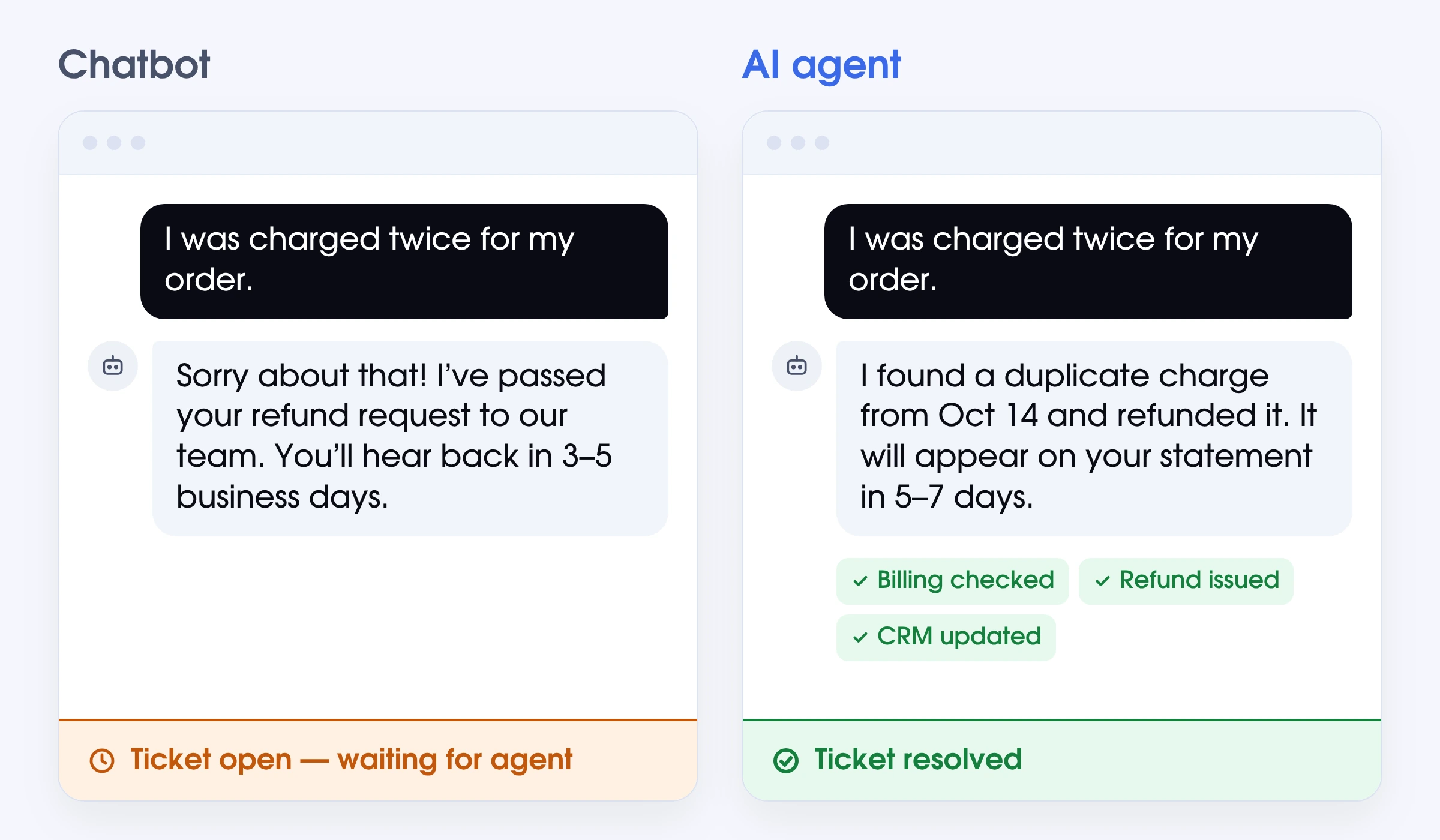
Agent or Chatbot
|
Automation Customer Service Chatbots |
AI Agents for Customer service Automation |
|
|
Primary output |
Generates a response to the customer |
Generates a response and executes the action |
|
Refund handling |
Tells the customer their refund is coming |
Processes the refund, then notifies the customer |
|
Billing access |
Reads from your billing platform |
Reads from and writes to your billing platform |
|
Ticket handling |
Drafts a reply for an agent to send |
Closes the ticket without human agent involvement |
|
Task ownership |
Handles the conversation, not the task |
Handles the conversation and completes the task |
|
Resolution |
Leaves the action for a human to take |
Resolves the issue end-to-end without handoff |
AI for Customer Service Process Automation
The benefits of AI in customer service automation show up at the process level. A billing dispute alone requires pulling transaction history, applying the refund policy, executing the refund, updating the CRM, and notifying the customer. Each task is fulfilled in a different system.
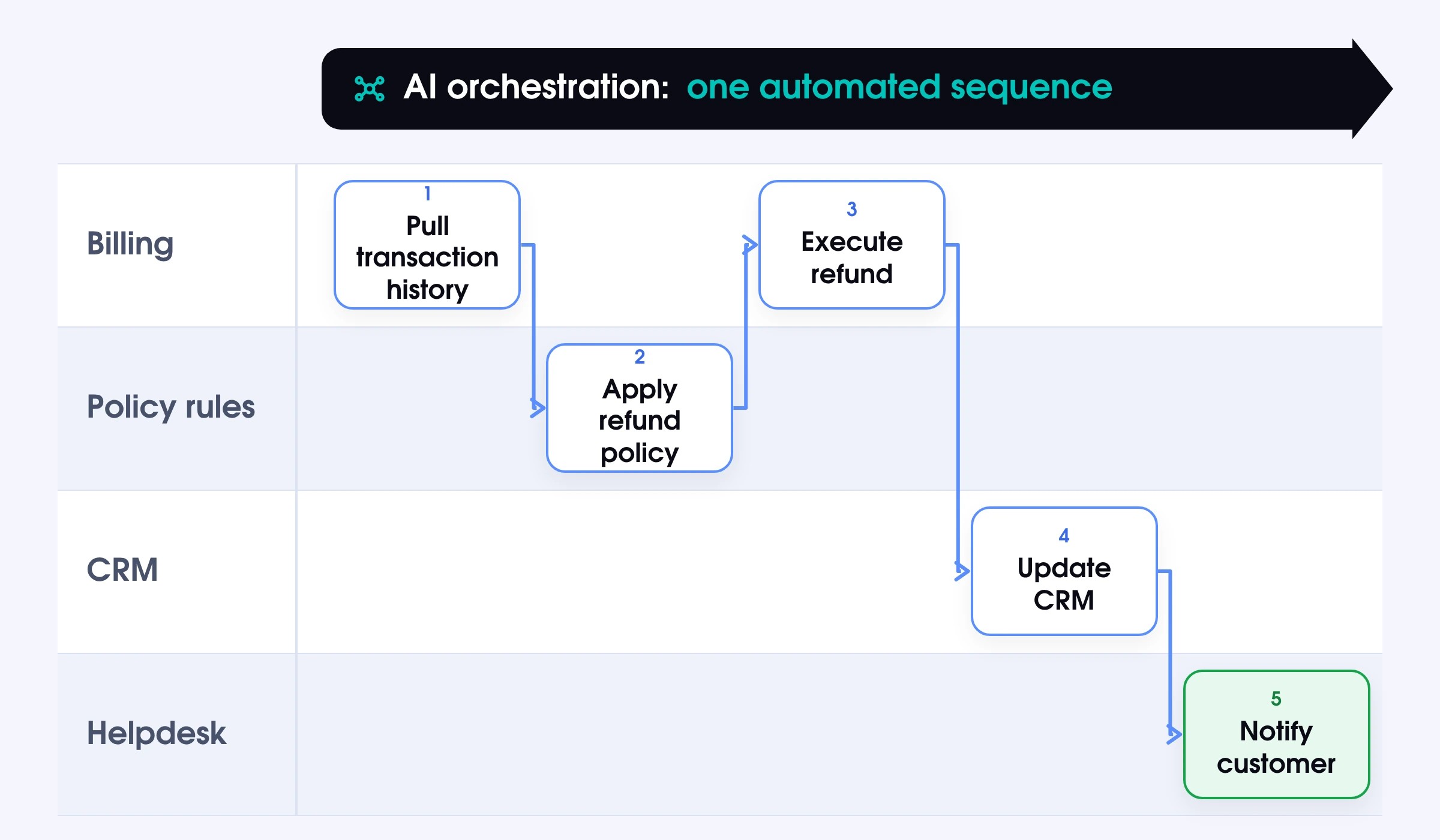
AI-driven orchestration connects those steps into a single automated sequence. That is why AI-driven customer service automation is not a simple reply generator, but a workflow executor, which resembles customer support outsourcing.
Decisions that Stay in Rules
You shouldn’t delegate each and every decision to AI systems. Financial thresholds, fraud-risk classifications, regulatory compliance checks, and any action that creates a material commitment should be governed by explicit business rules defined and documented by your team.
The role of AI is to handle interpretation and execution. The decision layer, especially for money, data, and legal risk, stays in rules that a human wrote and a human can change.
Disclosure Is Now a Buying Criterion
Most vendor conversations about AI for customer service automation still focus on features and pricing. Compliance is now part of that conversation too. In the EU, it has become particularly important.
What Article 50 Requires From 2 August 2026
Article 50 of the EU AI Act requires operators of AI-powered customer service systems to clearly inform users at the start of the interaction, in plain language, that they are communicating with an AI. The requirement applies to B2C deployments serving EU customers from 2 August 2026. A disclosure buried in terms of service does not satisfy it.
Non-compliance falls under the EU AI Act’s enforcement framework, which includes significant fines scaled to company turnover.
Compliance will probably become one of the more consequential customer support trends for 2027, so make sure you treat AI and automation in customer service responsibly.
What That Looks Like in the Product
Article 50 compliance requires 3 things at the product level.
- A clear statement that the customer is interacting with an automated system, delivered before the exchange begins in understandable words.
- A visible and accessible route to request a human agent whenever a customer needs it.
- A confirmed answer on where EU customer data is stored and processed, since that becomes a GDPR question running in parallel with disclosure.
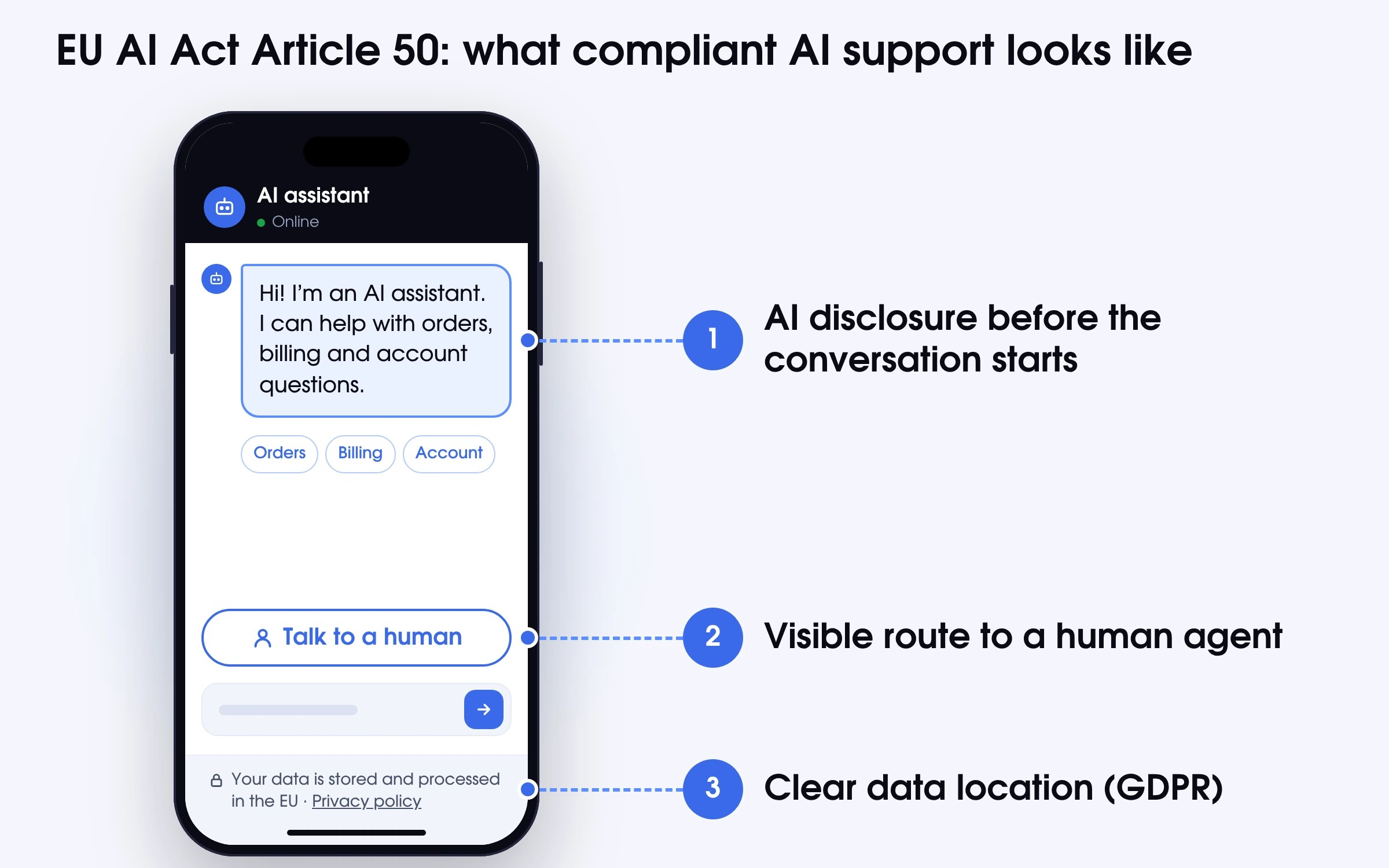
For existing deployments, review your current customer service automation software against these requirements. August 2026 has passed; if disclosure is not in place, the exposure is live.
How to Do Customer Service Automation Fast
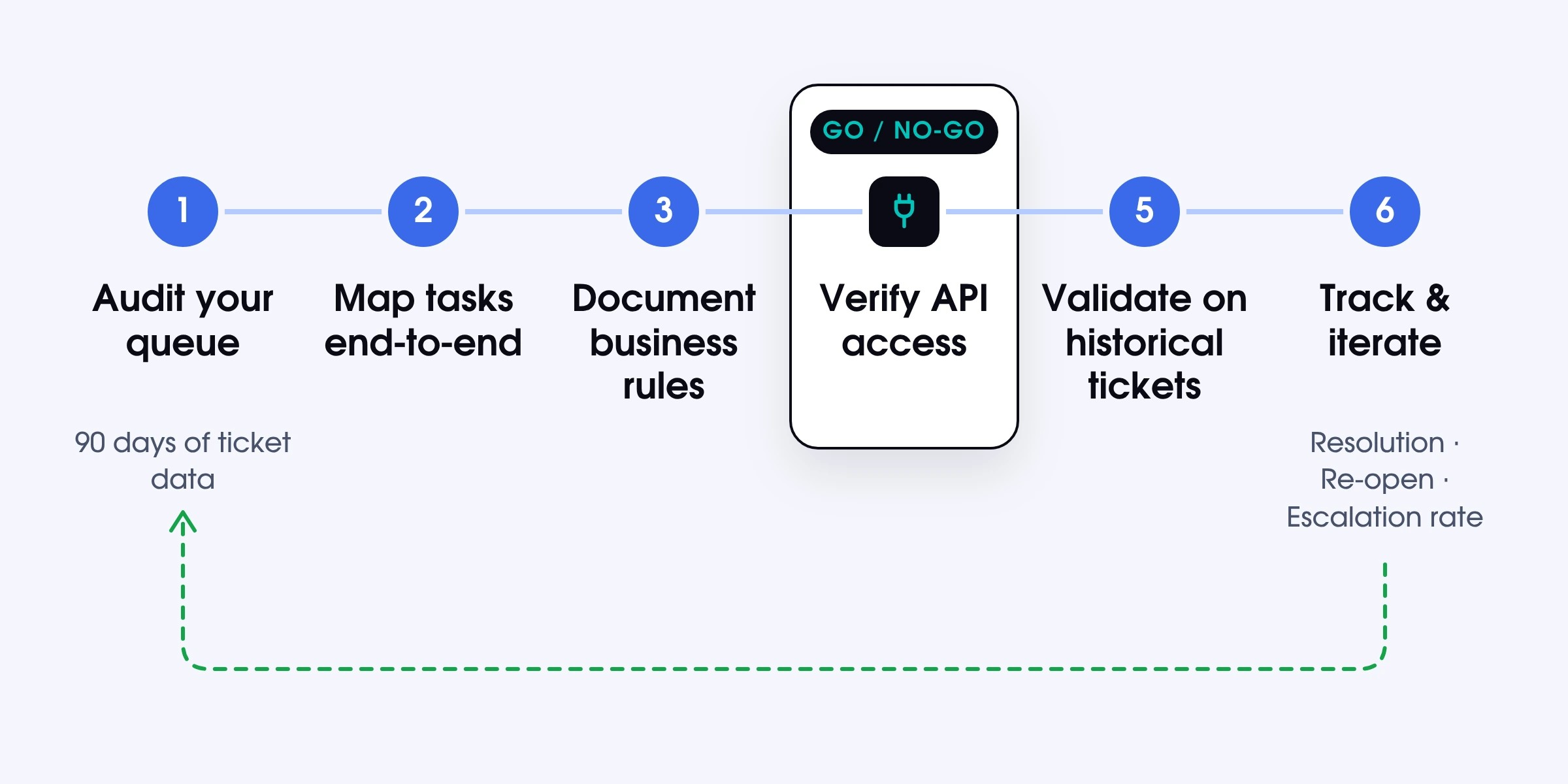
We have prepared a step-by-step guide to automating customer support to make it easier to team to start.
- Audit your queue first. Pull 90 days of ticket data and find the highest-volume categories with the most consistent resolution pattern.
- Map customer service tasks end-to-end. Document the full resolution path for each candidate before choosing any AI agents for customer service automation.
- Document the business rules explicitly. Write down what makes a request eligible for auto-resolution and what sends it to a human.
- Verify API access before committing. Confirm every system in the workflow can be connected. This is a go/no-go gate. Without API access, automated customer service work is not possible for that category.
- Validate before launch. Run the automation against historical tickets to check accuracy, edge case handling, and escalation behavior before it touches live volume.
- Plan for ongoing iteration. Track resolution rate, re-open rate, and escalation rate. Automation is not a set-and-forget deployment. Use customer feedback surveys and monitor customer feedback to track sentiment over time. Automation is not a set-and-forget deployment.
Build It, Buy It, or Pay for the Outcome
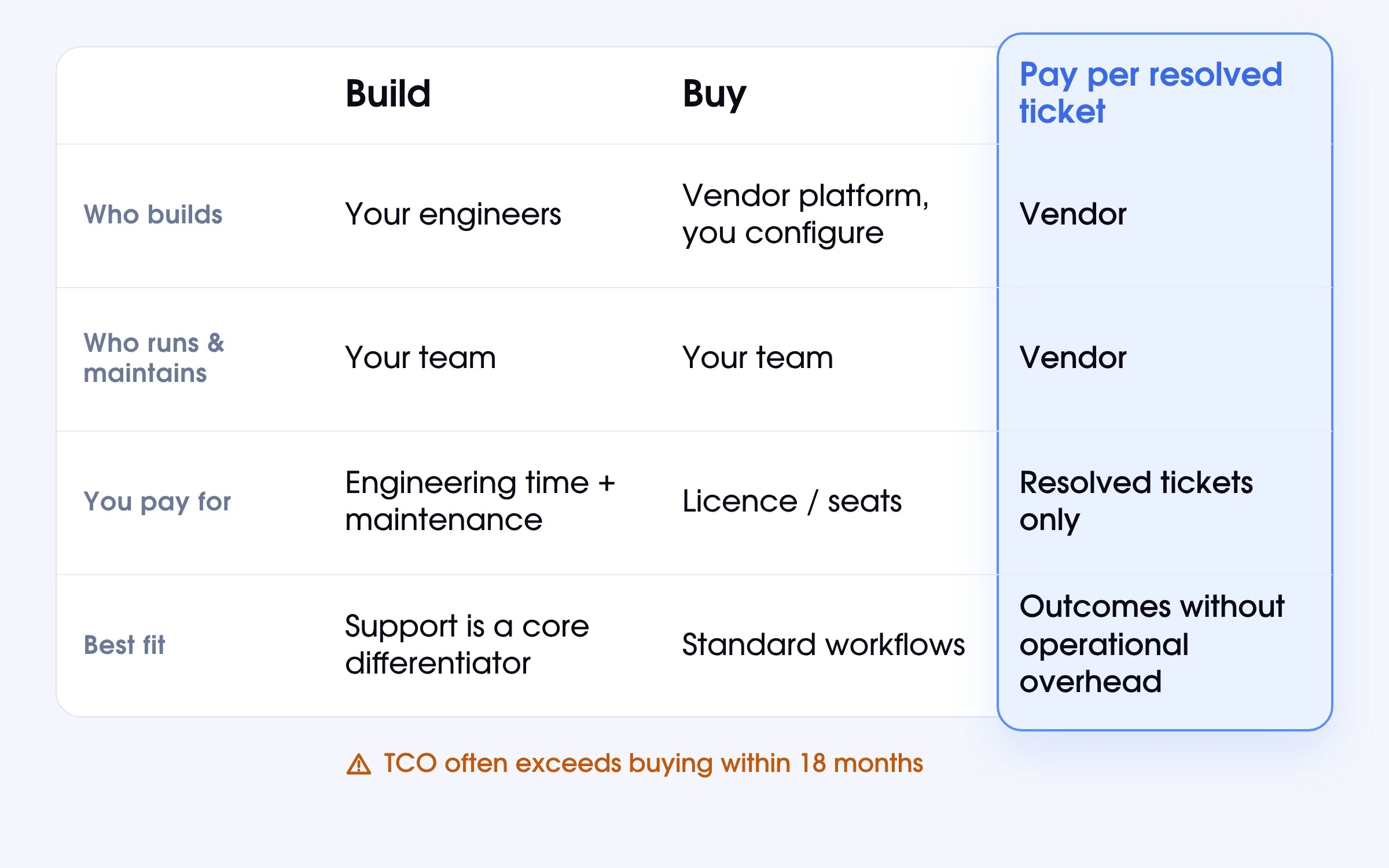
The right model depends on where your team’s capacity sits. Read the data below to make an informed choice.
When Building Makes Sense
Building makes sense when support is a core product differentiator. For example, if you have unique workflows that greatly depend on customer interaction, you can get sizeable customer service automation benefits. Still, the real cost is not the initial build, but the ongoing maintenance. Teams that treat it as a one-time project typically find total cost of ownership exceeds the buy alternative within 18 months.
When Buying Wins
It is a smart decision to buy an off-the-shelf customer service automation platform when your workflows are standard enough that a vendor’s existing integrations cover them. Look for platforms that include features like automated ticketing, interactive voice response, and built-in AI tools across multiple channels. The economics work when the cost of configuring and running the system internally is lower than building from scratch.
Still, many teams underestimate the fact that buying still requires operational ownership. You need to manage integrations, update rules, monitor performance, etc.
The Third Option Most Comparisons Skip
There is a third model worth knowing about – paying per resolved ticket instead of buying a platform or a seat. A vendor builds the automation, runs it, monitors it, and keeps it updated. The client pays only when a ticket is resolved. Because the vendor gets paid for resolution, their incentive is to make the system work accurately, not just to sell a subscription.
What Paying for the Outcome Looks Like with Soportio
An expert team behind Soportio designs, builds, and runs customer service automation for high-volume B2C teams. We handle the setup, the integrations, the monitoring, and everything that comes after launch.
What Soportio Takes Off Your Team
Soportio is a cutting-edge platform that resolves customer requests end-to-end. It will come in handy for many customer-related tasks, including:
- Processing refunds and cancellations by checking eligibility, executing the action via API, and closing the ticket automatically.
- Handling billing and subscription changes, e.g., plan updates, payment issues, and account modifications across connected systems.
- Resolving account and product requests such as access issues, profile updates, and how-to questions from the knowledge base.
- Classifying tickets by intent, assigning priority, and supporting intelligent routing across your customer service operations.
- Managing order and logistics queries, including status checks, delivery updates, and common order questions without agent involvement.
For every ticket the system escalates, the full conversation context, classification, and actions taken move with it. Support agents pick up where the system left off, enabling them to deliver personalized support on the issues that truly require it.
Pricing runs from $0.90 to $0.40 per resolved ticket based on monthly volume, with no implementation fee and no charge for tickets escalated to the client team.
How a Launch Runs
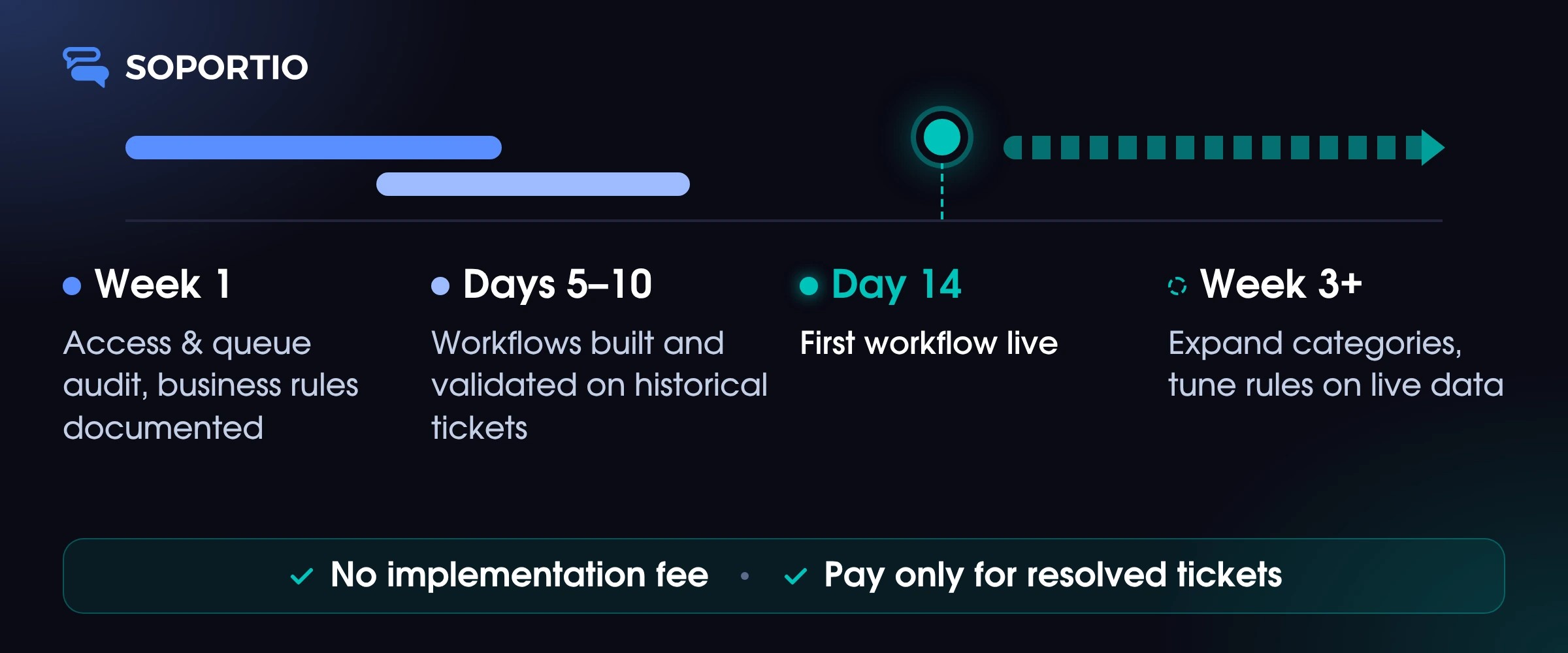
A typical Soportio customer service automation launch follows 4 phases.
- Week 1. You share API credentials, helpdesk and billing access, and a recent ticket export. We audit your queue and document the business rules we’ll encode.
- Days 5–10. We build the initial workflows and validate them against historical tickets. Nothing touches live customers until all processes are accurate.
- Day 14. The first workflow goes live. We monitor resolution rates, error types, and escalation patterns in real time.
- Week 3 onwards. We expand to additional categories as each validates, tune rules based on live data, and share results on the agreed-upon timeframes.
Where It Is Not the Right Fit
Soportio has become the core element of many customer service automation success stories. It can greatly expedite and simplify routine service tasks, but it is still not a one-size-fits-all solution.
It can hardly yield the desired results if you have:
- No API access. Without connections to your core systems, Soportio cannot resolve the relevant tickets automatically.
- Undocumented policies. If institutional knowledge isn’t written down yet, automation is useless.
- Judgment-heavy workflows. Tickets that require human assessment at every step are not suitable for automation regardless of tooling.
- Regulated authorization requirements. Some fintech customer support contexts require a licensed human to authorize specific actions before execution.
Automation Built and Run for You
Soportio is a flexible customer support automation solution for high-volume B2C operations. Your team handles the work that needs a human, and the system handles everything else.
The Numbers That Tell You It Worked
The full measurement framework is in the customer support metrics. Here are the most important indicators
|
Customer support metric |
What to measure |
What it tells you |
|
Resolution rate |
Share of tickets closed without reopening |
The primary signal. Deflection rate is not a substitute. |
|
Cost per resolved ticket |
Total automation cost divided by tickets resolved |
Track monthly against the pre-automation baseline. Trend matters more than the absolute number. |
|
Re-open rate |
Share of automated resolutions that get reopened |
A rate above your human baseline points to a workflow problem, not a volume problem. |
|
CSAT on automated contacts |
Customer satisfaction for automated versus human-handled tickets |
A significant gap surfaces workflow issues that volume metrics miss. |
|
Escalation rate |
Share of tickets automation hands to a human |
Too high means scope is too broad. A steady decline means the system is improving. |
Five Ways These Projects Go Sideways
Most AI customer service automation projects that underperform do so not because of the technology itself. The main issue is decisions made before and after the technology is deployed.
- Measuring deflection instead of resolution. A system optimized for deflection rate gets good at deflection, which tells you very little about whether customer problems were solved.
- Automating before rules are documented. Automation encodes whatever rules exist at build time, so inconsistent or undocumented rules get scaled across every ticket the system touches.
- Starting with the wrong ticket types. The correct starting point is the highest-volume, lowest-complexity category with clear rules and low-stakes errors.
- No edge case handling at launch. Every rule has exceptions, and a workflow with no defined escalation path will surface those exceptions in costly ways.
- Treating it as a completed project. Customer service automation that isn’t actively maintained drifts from operational reality as policies change, products evolve, and customer behavior shifts.